



'/%3E%3C/svg%3E)
 --%3E %3Csvg version='1.1' id='Fill' xmlns='http://www.w3.org/2000/svg' xmlns:xlink='http://www.w3.org/1999/xlink' x='0px' y='0px' viewBox='0 0 100 100' enable-background='new 0 0 100 100' xml:space='preserve'%3E %3Cpath fill='%23F15C02' d='M79.44,0.95H20.56C9.78,0.95,0.95,9.78,0.95,20.56v58.87c0,10.79,8.82,19.61,19.61,19.61h58.87 c10.79,0,19.61-8.83,19.61-19.61V20.56C99.05,9.78,90.22,0.95,79.44,0.95z M65.38,58.24l9.38,29.58L49.69,69.78L24.5,87.82 l9.34-29.6L8.8,39.6l30.73-0.17c0,0,6.98-19.61,10-28.93c0.54,1.36,9.88,29.1,9.88,29.1H91.2L65.38,58.24z'/%3E %3C/svg%3E)
' fill='%23F15C02' d='M49 0C21.938 0 0 21.938 0 49s21.938 49 49 49 49-21.938 49-49S76.062 0 49 0m0 82.709a7.54 7.54 0 1 1 0-15.08 7.54 7.54 0 0 1 0 15.08m7.54-28.412a7.541 7.541 0 0 1-15.08 0V22.831a7.54 7.54 0 0 1 15.08 0v31.466z'/%3E%3C/svg%3E)
MANUALS (4)

Product Highlights


Description
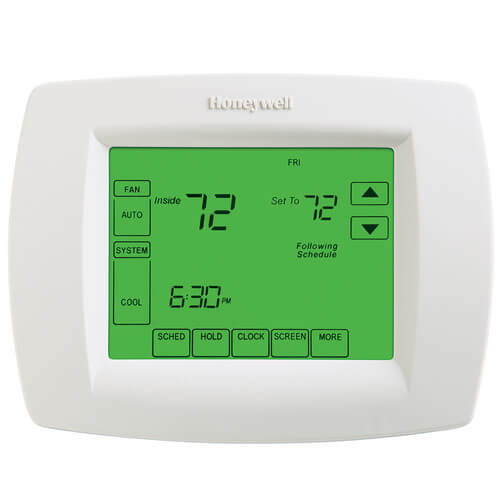
The TB8220 Commercial VisionPRO 8000 Touchscreen Programmable Thermostat is an effortless, seven day programmable thermostat that provides universal system compatibility, precise comfort control and is easy to-program. The TB8220 provides temperature control for gas, oil, electric and heat pumps for up to 3 heat, 2 cool systems.
Features
- Large, clear display with backlight shows the current and set temperature and time even in the dark.
- Menu-driven programming make setup effortless.
- Beautiful ergonomic design is smart and sophisticated to match your customers lifestyle.
- Touchscreen interaction Real-time clock keeps time during power failures and automatically updates to daylight savings.
- Saving Changes notification lets you know when the schedule changes have been saved.
- Change reminders let you know when to replace the batteries.
- Holiday Override options allow you to override the program schedule, as desired.
- Speedy same-schedule programming+no need to copy multiple days.
- Armchair programming allows you to remove the thermostat from the wall for programming.
Specs
| Amperage: | 1 |
|---|---|
| Application: | Multi-Stage (Heat/Cool) Heat Pump Commercial |
| Stages: | 3 Heat/2 Cool Heat Pump |
| Programmability: | Programmable 7 Day |
| Power Method: | Battery |
| User Interface: | Touchscreen |
| Mount: | Horizontal |
| Options: | Fan Control Large Display Works with Sensor |
| Changeover: | Auto |
| Temperature Range (F): | 40°F - 99°F |
| Voltage: | Low voltage |
| Wattage: | .48 to 24 |
| Wiring: | L |
| Color: | Premier White |
| Height: | 4-9/16" |
| Width (Inches): | 6" |
| Depth (Inches): | 1-3/8" |


Questions?
Product Reviews
Excellent for the designated use!

Works great for my wife
Product Q&A
5 QuestionsQ: how do i remove plate to get to the batteries?
Asked by peggy 14 years ago
Add your answer
Verified Reply- PexSupply StaffIt should pull straight off...do not use a screwdriver. Remove the thermostat from the base by pulling it straight out. After installing the new batteries, place the thermostat back on its base by aligning the terminal screw blocks with the pins on the back of the thermostat. Push the thermostat straight onto the base.
Q: My touch screen is not working. I can no longer touch it and make changes, it is stuck in on air conditioning. I put in new batteries but this didn't help. Do I need a new thermostat?
Asked by Susan 14 years ago
Add your answer
Verified Reply- PexSupply StaffAccording to the manufacturer, the only thing else to try is to clean screen. Please refer to page 18: http://customer.honeywell.com/techlit/pdf/PackedLit/62-3071.pdf If this does not resolve the issue, then yes, the thermostat would have to be replaced.
Q: can you hook up indoor wireless senors to this thermosat ? if so how can you put ? thank you.
Asked by sal 15 years ago
Add your answer
Verified Reply- PexSupply StaffThis unit only works with wired sensors.
Q: What is the difference between this unit and TH8110U1003?
Asked by 15 years ago
Add your answer
Verified Reply- PexSupply StaffThis is a 2-stage thermostat with dimensions slightly different from those of the TH8110U1003. It also has some different programming capabilities and works with rooftop air conditioners.
Q: how do you get the ac off of schedule or clear programs?
Asked by rick 15 years ago
Add your answer
Verified Reply- PexSupply StaffYou can override the schedule by following the instructions of page 18 of the manual below. To turn off the program schedule altogether, you will need to change Installer Setup Number 0160 (see page 13). http://s3.pexsupply.com/manuals/1249544874360/Honeywell_TB8220U_Specifications.pdf