


'/%3E%3C/svg%3E)
 --%3E %3Csvg version='1.1' id='Fill' xmlns='http://www.w3.org/2000/svg' xmlns:xlink='http://www.w3.org/1999/xlink' x='0px' y='0px' viewBox='0 0 100 100' enable-background='new 0 0 100 100' xml:space='preserve'%3E %3Cpath fill='%23F15C02' d='M79.44,0.95H20.56C9.78,0.95,0.95,9.78,0.95,20.56v58.87c0,10.79,8.82,19.61,19.61,19.61h58.87 c10.79,0,19.61-8.83,19.61-19.61V20.56C99.05,9.78,90.22,0.95,79.44,0.95z M65.38,58.24l9.38,29.58L49.69,69.78L24.5,87.82 l9.34-29.6L8.8,39.6l30.73-0.17c0,0,6.98-19.61,10-28.93c0.54,1.36,9.88,29.1,9.88,29.1H91.2L65.38,58.24z'/%3E %3C/svg%3E)
' fill='%23F15C02' d='M49 0C21.938 0 0 21.938 0 49s21.938 49 49 49 49-21.938 49-49S76.062 0 49 0m0 82.709a7.54 7.54 0 1 1 0-15.08 7.54 7.54 0 0 1 0 15.08m7.54-28.412a7.541 7.541 0 0 1-15.08 0V22.831a7.54 7.54 0 0 1 15.08 0v31.466z'/%3E%3C/svg%3E)
MANUALS (3)
 --%3E %3Csvg version='1.1' id='Half' xmlns='http://www.w3.org/2000/svg' xmlns:xlink='http://www.w3.org/1999/xlink' x='0px' y='0px' viewBox='0 0 100 100' enable-background='new 0 0 100 100' xml:space='preserve'%3E %3Cg%3E %3Cpath fill='%23F15C02' d='M30.05,70.23l3.79-12.01L8.8,39.6l30.73-0.17c0,0,6.98-19.61,10-28.93c0.54,1.36,9.88,29.1,9.88,29.1h1.58 L93.71,7.18c-3.58-3.82-8.66-6.23-14.28-6.23H20.56C9.78,0.95,0.95,9.78,0.95,20.56v58.87c0,5.41,2.22,10.32,5.79,13.88 L30.05,70.23z'/%3E %3C/g%3E %3Cpath fill='%23FBC8B4' d='M93.71,7.18L60.98,39.6H91.2L65.38,58.24l9.38,29.58L49.69,69.78L24.5,87.82l5.55-17.59L6.75,93.32 c3.55,3.54,8.44,5.73,13.82,5.73h58.87c10.79,0,19.61-8.83,19.61-19.61V20.56C99.05,15.4,97.01,10.69,93.71,7.18z'/%3E %3C/svg%3E)

Product Highlights


Description
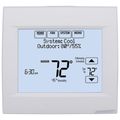
The Honeywell TH9421U touch screen universal programmable thermostat provides electronic control of 24 Vac heating and cooling systems of 750 mV heating systems in addition to humidification dehumidification and ventilation.
Features
- Contains all features of standard VisionPRO, except arm chair programming.
- Thermostat connects with Equipment Interface Module or EnviraZone panel to control temperature, humidification, dehumidification and ventilation from a single point in the home.
- Automatically raises humidity levels throughout all rooms in the home, moisturizing air to prevent symptoms of dryness and to protect hardwood flooring and woodwork.
- Automatically lowers humidity levels through all rooms in the home, utilizing air conditioning or a whole house dehumidifier to prevent dampness, stickiness or odors symptoms often associated with air that is too moist.
- Removes air pollutants by exchanging the stale air in a house with fresh, filtered air better than having an open window.
Specs
| Amperage: | 1 |
|---|---|
| Application: | Multi-Stage (Heat/Cool) Heat Pump |
| Stages: | 4 Heat/2 Cool Heat Pump 3 Heat/2 Cool |
| Programmability: | 7 Day Programmable |
| User Interface: | Touchscreen |
| Mount: | Horizontal |
| Options: | Large Display Works with Sensor Fan Control Auto Changeover |
| Power Method: | Communicating |
| Changeover: | Auto Manual |
| Temperature Range (F): | 40°F - 99°F |
| Max Temp Differential: | 1°F |
| Operating Humidity: | 5 to 90% RH, non-condensing |
| Voltage: | Low voltage |
| Wattage: | 12 to 30 |
| Wiring: | G Rc Vnt1 Rh L C Y2 R Dhm2 Y 1 Vnt2 3 2 |
| Color: | Premier White |
| Width (Inches): | 6" |
| Height: | 4-9/16" |
| Depth (Inches): | 1-1/4" |
Contact

Happy Labor Day!
Product Reviews
Great Thermostat

nice piece of equipment
A necessity to your high effiency system
Great product and great price from Pex
Would buy this again
I would buy this product again
 --%3E %3Csvg version='1.1' id='With-RB' xmlns='http://www.w3.org/2000/svg' xmlns:xlink='http://www.w3.org/1999/xlink' x='0px' y='0px' viewBox='0 0 100 100' enable-background='new 0 0 100 100' xml:space='preserve'%3E %3Cpath fill='%23FBC8B4' d='M79.44,0.95H20.56C9.78,0.95,0.95,9.78,0.95,20.56v58.87c0,10.79,8.82,19.61,19.61,19.61h58.87 c10.79,0,19.61-8.83,19.61-19.61V20.56C99.05,9.78,90.22,0.95,79.44,0.95z M65.38,58.24l9.38,29.58L49.69,69.78L24.5,87.82 l9.34-29.6L8.8,39.6l30.73-0.17c0,0,6.98-19.61,10-28.93c0.54,1.36,9.88,29.1,9.88,29.1H91.2L65.38,58.24z'/%3E %3C/svg%3E)
There's good and bad
Tough installation - great device.
The best price [...]
WORTH IT!!!
Product Q&A
8 QuestionsQ: Hi, I have this unit installed with a humidifier and outdoor temp sensor. Set up was easy and I'm happy with the overall product. I have two questions. 1. I'm using the humidity sensor in the t stat itself but I notice that the humidity is always above 58% even though it is extremely dry in the house. This only gives me 2% to work with as I can't set the humidity any higher than 60%. Is there any way to calibrate the humidity sensor on the stat or increase the desired humidity. 2. The right side of the t stat display is dimmer than the rest of the display particularly in the bottom right corner. It almost looks rippled. Is there anything I can do about this? Thanks,
Asked by Johnny 15 years ago
Add your answer
You should be able to calibrate the sensor based on the instruction manual. However, it may turn out that the sensor is not picking up the humidity properly and might need to be repaired as well with the display issue.
Hi Johnny, from my experience with this unit, the humidity levels indicated on the thermostat match the levels of an independent wireless thermo/hygrometer I compared it with. I don't notice any difference in the uniformity of the display or a "rippled" corner. I know you can calibrate both the temp and humidity levels in the setup but it almost sounds like there may be something wrong with your unit as 58% humidity is actually pretty high in my opinion. Generally 50% is about right and certainly shouldn't feel dry. I'm happy with mine set about 40%. Maybe you should try and exchange it if it's still under warranty. Good luck.
Have you verified that your indoor humidity is what the unit has displayed? 58% is quite high for indoor, especially in the winter.I am not aware of any humidity calibration for the unit. I would think if it is innacurate it has failed, especially if the display is having problems since their is an internal voltage regulator that may of failed causing the humidity problem also.
Q: My humidifier is not running enough to reach my desired humidity level because my furnace is oversized for my house and does not run with a call for heat long enough for the humidifier. I need a thermostat that will turn the humidifier and blower on without heat. Will this system do that?
Asked by Clint 16 years ago
Add your answer
Verified Reply- PexSupply StaffThe manufacturer suggests using the YTH9421C1010, as this model uses the Frost Protection feature too. It has an option to bring on the fan without a call for heat to humidify. Please use ISU #374 setting #1 - see page 4 of the installation instructions ( http://s3.pexsupply.com/manuals/1249544894162/Honeywell_YTH9421C1002_Install_Guide.pdf ).
There is a setting in the installation programming that you can change that will force the fan on when the house needs humidity. You may want to run hot water to the humidifier to increase it's performance since the air won't be heated.
Q: With an outdoor sensor installed, frost control enabled, and a humity setting of say 45%, will the thermostat raise and lower the actual indoor humidity based on the outdoor temprature?
Asked by RCE 16 years ago
Add your answer
Verified Reply- PexSupply StaffIt will if you are using the scale displayed on the thermostat for the frost protection. The humidity will be reduced when the outdoor air temperature is low and could possibly add too much moisture to the home. Once the outdoor temperature again rises, the humidity will increase to the selected set point.
Q: Do you have instruction for the proper usage of the thermnstat?
Asked by Arnie 16 years ago
Add your answer
Verified Reply- PexSupply StaffHere is a link to the operating manual: http://s3.pexsupply.com/manuals/1249544894162/Honeywell_YTH9421C1002_Operating_Manual.pdf
Q: What settings in the Thermostat do i use to make the fresh air ventilator come on and off (HR105B)in the program and also for the Dehumifier TrueDry DH65.
Asked by Ski 16 years ago
Add your answer
Verified Reply- PexSupply StaffFor information on turning the dehumidifier and ventilator on and off please see pages 18 and 19 in the following manual: http://s3.pexsupply.com/manuals/1249544894162/Honeywell_YTH9421C1002_Operating_Manual.pdf
Q: Hi, I am generally very pleased with the thermostat. However, I live in Calgary and the temperature at the moment is -30C - and the bottom ledges of my windows have frozen, just like last winter when I didn't have this thermostat. The frost setting was at 5 prior to the start of the cold weather and I have turned the setting down to 3, to no avail. There is no help in the manual as to where the setting should be. Please advise.
Asked by Andy 16 years ago
Add your answer
Verified Reply- PexSupply StaffFirst, press MORE until the humidifier screen is displayed. Next, press sort to set the Humidity and Frost Control. When using Frost Protection, if frost or condensation appears on the windows, lower the frost setting. Wait at least 1 day before adjusting the frost level again. Once frost no longer appears, the thermostat will control humidity to the maximum level without frosting or fogging windows and without further adjustments. Press DONE to save and exit or press CANCEL to exit without savings the changes. Please note that if you do not have an outdoor temperature sensor, the Frost Control level will not be displayed.
My installer said to turn the frost protection feature off and just set a constant humidity level like 35%. He said, with frost protection on, sometimes the humidifier wouldn't even turn on so just adjust the humidity level to a level that doesn't frost your windows. Also, recommended outside air temp sensor.
I guess your question is about the humidity setting of the IAQ. Unfortunately there is no clear description about the frost control setting. Basically the setting is from 1 to 10 which the 1 is less humidity and the 10 is the highest humidity in accordance with the outdoor temperature. I assume that you already have a outdoor temperature sensor installed with your IAQ t-stat. In your case the best you can do is lower the frost setting and wait for a day or two to see the result. If the frost setting 3 doesn't work for you you can use lower settings or you can reduce overall humidity setting. Do you have a a reference humidistat to compare the humidity reading of the IAQ? A reliable humidistat may help you to see the actual humidity level of your house. So You may calibrate IAQ'a humidity measurements according to the reference humidistat in order to avoid with a high humidity at your house.
Q: what is L terminal for
Asked by 16 years ago
Add your answer
Verified Reply- PexSupply StaffIt is an input terminal for the Heat Pump Equipment Monitor.
Q: Will this thermostat control humidty (I need dehumdification only) as we live in FL and are gone during the summer? Presently I have one of your humidistats that does the job but I want to get a new ac system and replace my present stat and humidistat with one device. Will the dumidification feature work totally independent from the heat/cooling setting? Thanks
Asked by Denny 16 years ago
Add your answer
Verified Reply- PexSupply StaffThis will control dehumidifier units as well as humidifiers. Yes, the dehumidification feature works independently of the heat/cooling setting.