

CONTACT & SUPPORT
Live Chat: Online Now



'/%3E%3C/svg%3E)
Hover image to zoom
 --%3E %3Csvg version='1.1' id='No-RB' xmlns='http://www.w3.org/2000/svg' xmlns:xlink='http://www.w3.org/1999/xlink' x='0px' y='0px' viewBox='0 0 100 100' enable-background='new 0 0 100 100' xml:space='preserve'%3E %3Cpath fill='%23CECECE' d='M79.44,0.95H20.56C9.78,0.95,0.95,9.78,0.95,20.56v58.87c0,10.79,8.82,19.61,19.61,19.61h58.87 c10.79,0,19.61-8.83,19.61-19.61V20.56C99.05,9.78,90.22,0.95,79.44,0.95z M65.38,58.24l9.38,29.58L49.69,69.78L24.5,87.82 l9.34-29.6L8.8,39.6l30.73-0.17c0,0,6.98-19.61,10-28.93c0.54,1.36,9.88,29.1,9.88,29.1H91.2L65.38,58.24z'/%3E %3C/svg%3E)
Hover image to zoom
$1,228.00 each

Backorder
MANUALS (1)
Free Shipping This item ships free
Easy Returns No restocking fee for 90 days
Product Highlights
–

MicroM
Description
–
Serviceman's MicroM Display Kit
The SMDK-1004 is a portable palmtop display kit that facilitates the installation of the MicroM, Flame Safeguard Control. It can also be used later to obtain operational and historical information. The SMDK-1004 consists of an ED510 alphanumaic display; a MED2, remote daughter board and a 4 foot cable.
The MicroM provides an interface to the optional ED510 display module. The ED510 connects to the MicroM through the plug-in board using a ED580 cable. The ED580 cable is available in 2, 4, or 8 foot lengths. Part number 129-145 -1 (4 ft.), -2 (8 ft.), -4 (2 ft.) is available for remote mounting the ED510 Display Module.
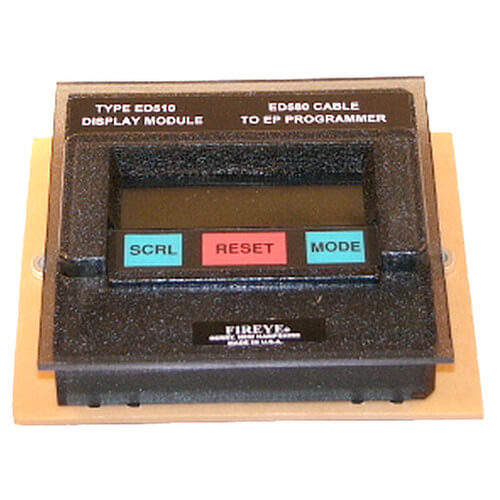
The ED510 Display Module is a backlit, 2 line by 16 character LCD display with keypad to provide both current operation and historical information of the MicroM. The ED510 contains a keypad consisting of three push keys, SCRL, RESET and MODE.
The ED510 displays current burner status, first out annunciation in the event of a lockout condition, historical burner information, detailed lockout information of the last six (6) lockout conditions and programmer configuration information. Through the display the ability to program the unit address for communications, as well as resetting the stored information (cycles, hours, and lockouts) to zero is provided.
At any time the MicroM is powered, the SCRL key is used to scroll through and display the total number burner hours, burner cycles, burner lockouts and system hours on the bottom line of the ED510 display. The top line will continue to show the current run mode of the control (e.g. PURGE, AUTO, etc.) Following the historical information, the SCRL key will display three (3) sub-menus providing the following information and/or functions:
The system sub-menus require the MODE key to gain access to the information associated with each sub-menu. An arrow is displayed in the lower right hand corner of the display to indicate a system sub-menu is available. Once within the sub-menu, pressing the SCRL key displays the next item within the sub-menu, and pressing the MODE key will exit the sub-menu and return the display to the top of the main menu.
Note: Image may not be actual representation of item.
The SMDK-1004 is a portable palmtop display kit that facilitates the installation of the MicroM, Flame Safeguard Control. It can also be used later to obtain operational and historical information. The SMDK-1004 consists of an ED510 alphanumaic display; a MED2, remote daughter board and a 4 foot cable.
The MicroM provides an interface to the optional ED510 display module. The ED510 connects to the MicroM through the plug-in board using a ED580 cable. The ED580 cable is available in 2, 4, or 8 foot lengths. Part number 129-145 -1 (4 ft.), -2 (8 ft.), -4 (2 ft.) is available for remote mounting the ED510 Display Module.
The ED510 Display Module is a backlit, 2 line by 16 character LCD display with keypad to provide both current operation and historical information of the MicroM. The ED510 contains a keypad consisting of three push keys, SCRL, RESET and MODE.
The ED510 displays current burner status, first out annunciation in the event of a lockout condition, historical burner information, detailed lockout information of the last six (6) lockout conditions and programmer configuration information. Through the display the ability to program the unit address for communications, as well as resetting the stored information (cycles, hours, and lockouts) to zero is provided.
At any time the MicroM is powered, the SCRL key is used to scroll through and display the total number burner hours, burner cycles, burner lockouts and system hours on the bottom line of the ED510 display. The top line will continue to show the current run mode of the control (e.g. PURGE, AUTO, etc.) Following the historical information, the SCRL key will display three (3) sub-menus providing the following information and/or functions:
- Lockout History (with burner cycle and burner hour time stamp).
- Program Setup (to display programmer type, purge timing, switch configuration, etc.)
- System Information (values of average pilot and main flame signal, and reset burner history).
The system sub-menus require the MODE key to gain access to the information associated with each sub-menu. An arrow is displayed in the lower right hand corner of the display to indicate a system sub-menu is available. Once within the sub-menu, pressing the SCRL key displays the next item within the sub-menu, and pressing the MODE key will exit the sub-menu and return the display to the top of the main menu.
Note: Image may not be actual representation of item.
Specs
–
| Product Type: | Display Module |
|---|---|
| Used With: | MicroM |


Questions?
Speak with a real person who will go out of the way to help!
Call or text 888-757-4774
Monday – Thursday
8am–7:45pm
Friday
9am–7:45pm
Saturday – Sunday
9am–5:45pm
Free Shipping
On orders over $99
We offer flexible shipping and scheduling options, up-to-date delivery estimates, and free ground shipping on any order over $99 to make sure your order gets to you on-time, for less.
Shipping PolicyEasy Returns
Returning items is as simple as 1-2-3
Ordered the wrong product? Item damaged in transit? Our 3-step process makes returning products easy – even up to a year after purchase – with no restocking fees on returns made within 90 days.
Return Policy