


'/%3E%3C/svg%3E)
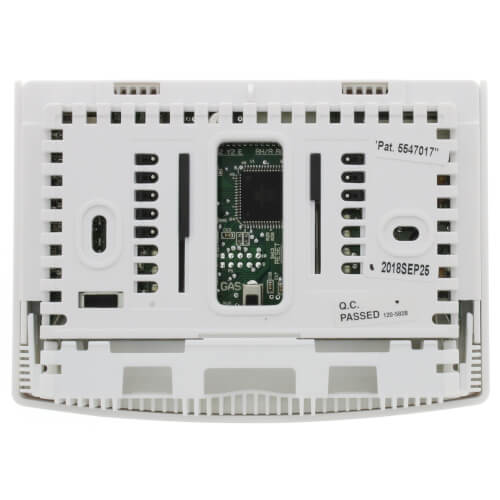
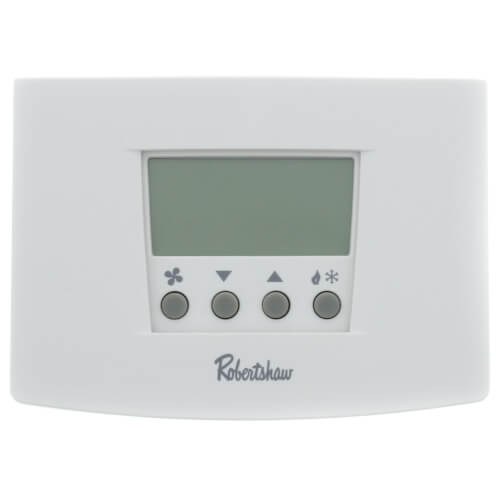
Digital 7 Day Programmable Thermostat Heat Pump/Single Stage (1 Heat/1 Cool)
 --%3E %3Csvg version='1.1' id='Fill' xmlns='http://www.w3.org/2000/svg' xmlns:xlink='http://www.w3.org/1999/xlink' x='0px' y='0px' viewBox='0 0 100 100' enable-background='new 0 0 100 100' xml:space='preserve'%3E %3Cpath fill='%23F15C02' d='M79.44,0.95H20.56C9.78,0.95,0.95,9.78,0.95,20.56v58.87c0,10.79,8.82,19.61,19.61,19.61h58.87 c10.79,0,19.61-8.83,19.61-19.61V20.56C99.05,9.78,90.22,0.95,79.44,0.95z M65.38,58.24l9.38,29.58L49.69,69.78L24.5,87.82 l9.34-29.6L8.8,39.6l30.73-0.17c0,0,6.98-19.61,10-28.93c0.54,1.36,9.88,29.1,9.88,29.1H91.2L65.38,58.24z'/%3E %3C/svg%3E)
 --%3E %3Csvg version='1.1' id='Half' xmlns='http://www.w3.org/2000/svg' xmlns:xlink='http://www.w3.org/1999/xlink' x='0px' y='0px' viewBox='0 0 100 100' enable-background='new 0 0 100 100' xml:space='preserve'%3E %3Cg%3E %3Cpath fill='%23F15C02' d='M30.05,70.23l3.79-12.01L8.8,39.6l30.73-0.17c0,0,6.98-19.61,10-28.93c0.54,1.36,9.88,29.1,9.88,29.1h1.58 L93.71,7.18c-3.58-3.82-8.66-6.23-14.28-6.23H20.56C9.78,0.95,0.95,9.78,0.95,20.56v58.87c0,5.41,2.22,10.32,5.79,13.88 L30.05,70.23z'/%3E %3C/g%3E %3Cpath fill='%23FBC8B4' d='M93.71,7.18L60.98,39.6H91.2L65.38,58.24l9.38,29.58L49.69,69.78L24.5,87.82l5.55-17.59L6.75,93.32 c3.55,3.54,8.44,5.73,13.82,5.73h58.87c10.79,0,19.61-8.83,19.61-19.61V20.56C99.05,15.4,97.01,10.69,93.71,7.18z'/%3E %3C/svg%3E)
' fill='%23F15C02' d='M49 0C21.938 0 0 21.938 0 49s21.938 49 49 49 49-21.938 49-49S76.062 0 49 0m0 82.709a7.54 7.54 0 1 1 0-15.08 7.54 7.54 0 0 1 0 15.08m7.54-28.412a7.541 7.541 0 0 1-15.08 0V22.831a7.54 7.54 0 0 1 15.08 0v31.466z'/%3E%3C/svg%3E)
MANUALS (1)

Product Highlights


Description
Features
- Fully programmable with soft touch keys to easily set four events per day AND 7 day scheduling.
- Copy command that makes programming simple to set up and flexible to use.
- Pop-Up Wizard to customize thermostat settings with an instant start-up menu. The RS6000 thermostats are fully compatible with all standard 24V AC heating and cooling systems. Additional compatibility with multi-stage gas/electric furnaces and heat pump systems are available in the RS6220 and RS6320 models
- Auto Changeover: Switches automatically between heating and cooling for constant home comfort.
- Pop-Up Wizard: Launches instant installation menu to quickly enter the settings for programmed thermostat functions.
- Bigger Brighter Backlight with Nightlight Option: Makes viewing and setting the temperature easier any time of the day.
- Worry-Free Memory Retention: Maintains set point and programmed parameters, even during power outages.
- Easy Change Battery Access: Provides drop down removable compartment for quick battery replacement.
- Circulating Fan: Maintains optimal air circulation between demand cycles for improved comfort with minimal energy use.
- Low Temperature Freeze Protection: Turns on heat automatically when temperature goes below 41°F. Protects pipes from freezing.
- Adjustable Temperature Differential and Upstaging: Provides for full selection of parameters to deliver maximum comfort or energy savings.
- High and Low Setpoint Limits: Protects the heating and cooling systems by limiting temperature settings.
Specs
| Application: | Single-Stage (Heat/Cool) Heat Pump |
|---|---|
| Stages: | 1 Heat/1 Cool |
| Programmability: | Programmable 7 Day |
| User Interface: | Push Button |
| Mount: | Horizontal |
| Options: | Password Lockout Fan Control Large Display Auto Changeover |
| Voltage: | 24V |
| Changeover: | Auto |
| Operating Temp Range: | 45-95F |
| Humidity Control: | No |
| Wireless: | No |


Questions?
Compare Similar Products
Heat Pump
7 Day
Product Reviews
Most Liked Positive Review
RS6110 Love the adjustable differential in 0.5 degree steps.
Most Liked Negative Review
 --%3E %3Csvg version='1.1' id='With-RB' xmlns='http://www.w3.org/2000/svg' xmlns:xlink='http://www.w3.org/1999/xlink' x='0px' y='0px' viewBox='0 0 100 100' enable-background='new 0 0 100 100' xml:space='preserve'%3E %3Cpath fill='%23FBC8B4' d='M79.44,0.95H20.56C9.78,0.95,0.95,9.78,0.95,20.56v58.87c0,10.79,8.82,19.61,19.61,19.61h58.87 c10.79,0,19.61-8.83,19.61-19.61V20.56C99.05,9.78,90.22,0.95,79.44,0.95z M65.38,58.24l9.38,29.58L49.69,69.78L24.5,87.82 l9.34-29.6L8.8,39.6l30.73-0.17c0,0,6.98-19.61,10-28.93c0.54,1.36,9.88,29.1,9.88,29.1H91.2L65.38,58.24z'/%3E %3C/svg%3E)
doesn't work
Great product

This tstat has a temp differential (cycle time) adjustment.
Great Service!
OK
doesn't work
Great Thermostat - Great Price
Very impressed
Excellent
Great replacement for an earlier model
exelent price, perefect delivery
Product Q&A
6 QuestionsQ: I recently purchase a home with a Robertshaw thermostat with no instructions. It looks like the pictures of 6100 series, but there is no identifying number or model number on the thermostat itself (which I don't understand at all). The only number I can find anywhere is 355-00034-001 Rev. A under the instructions for removing the batteries on the cover. Apparently there are many things I can do with this thermostat, but all I have been able to do without instructions is turn it on/off, heat/cool, and set the temperature. How do I obtain instructions, especially when I don't have a model number to refer too?
Asked by Linus 9 years ago
Add your answer
Verified Reply- Supplyhouse StaffIt will require knowing which model you have to provide specific details but below I have included a link for a manual which does cover a variety of different models including the 4000, 5000 and 6000 series. https://s3.amazonaws.com/s3.supplyhouse.com/product_files/RS5110-Install.pdf
Q: how do you change batteries---mine does not appear to have any
Asked by wayne 10 years ago
Add your answer
Verified Reply- SupplyHouse StaffTo remove the battery compartment gently squeeze the ribbed edges on both sides. The battery compartment will pull down from the thermostat body and will detach. Install two AA batteries following the polarity as shown inside the compartment. Place compartment back into the thermostat.
Q: What is 2nd stage auto heat and is that the correct setting for the thermostat to decide whether we need heat or ac
Asked by Steve 10 years ago
Add your answer
Verified Reply- SupplyHouse StaffThis thermostat can be used for 1 heating source and 1 cooling source and is single stage. It has the auto feature to change from heat or cool.
Q: It suggests the thermostat settings can be locked but I can't figure out how.
Asked by Schunter 14 years ago
Add your answer
Push the up arrow button and the button featuring an icon of a flame and snowflake to password-protect your settings, or to unlock the system when already password-protected. Hold the two buttons for five seconds, and when prompted, enter a four-digit password by pushing the up and down arrows to select each digit. After selecting each one, push the flame/snowflake button to move on, or push the fan icon button to go back. Once all four digits are entered, wait five seconds for the system to unlock or save the new password. Read more: Instructions for the Robertshaw RS6110 | eHow.com http://www.ehow.com/how_7564112_instructions-robertshaw-rs6110.html#ixzz1vmYBTDFU If you unlock the thermostat by entering a password, you must completely reset the password to protect it again.
Yes, they can be locked. You have to press and hold the right 2 buttons ( Up arrow and heat/cool) at the same time. Hold for a few seconds and it will start blinking. Use the arrow buttons to scroll for your desired numbers and enter a 4 digit code. Once you've entered the code you want, just wait a few seconds and the unit will lock. You have to repeat the process to unlock. Scott
These instructions are in the installation document that came with the thermostat.
Q: what honeywell product is this compatable with? I have a RS 9600 thermostat. Thank You
Asked by 15 years ago
Add your answer
Verified Reply- PexSupply StaffRS5110 is the recommended replacement for 9600. Honeywell part TH6110D1005 is a comparable model.
The Robert Shaw Digital 7 Day Programmable Thermostat Heat Pump/Single Stage (1 Heat/1 Cool) is comparable to the Honeywell RTH7600D Touchscreen 7-Day Programmable Thermostat.
Q: how do unlock the controls
Asked by 16 years ago
Add your answer
Verified Reply- PexSupply StaffTake a look at this User Manual: http://www.robertshawtstats.com/images/docs/352-00057-001.pdf
Enter the password that you entered to lock controls; then enter the same or new password to lock it again.