


'/%3E%3C/svg%3E)
 --%3E %3Csvg version='1.1' id='No-RB' xmlns='http://www.w3.org/2000/svg' xmlns:xlink='http://www.w3.org/1999/xlink' x='0px' y='0px' viewBox='0 0 100 100' enable-background='new 0 0 100 100' xml:space='preserve'%3E %3Cpath fill='%23CECECE' d='M79.44,0.95H20.56C9.78,0.95,0.95,9.78,0.95,20.56v58.87c0,10.79,8.82,19.61,19.61,19.61h58.87 c10.79,0,19.61-8.83,19.61-19.61V20.56C99.05,9.78,90.22,0.95,79.44,0.95z M65.38,58.24l9.38,29.58L49.69,69.78L24.5,87.82 l9.34-29.6L8.8,39.6l30.73-0.17c0,0,6.98-19.61,10-28.93c0.54,1.36,9.88,29.1,9.88,29.1H91.2L65.38,58.24z'/%3E %3C/svg%3E)
' fill='%23F15C02' d='M49 0C21.938 0 0 21.938 0 49s21.938 49 49 49 49-21.938 49-49S76.062 0 49 0m0 82.709a7.54 7.54 0 1 1 0-15.08 7.54 7.54 0 0 1 0 15.08m7.54-28.412a7.541 7.541 0 0 1-15.08 0V22.831a7.54 7.54 0 0 1 15.08 0v31.466z'/%3E%3C/svg%3E)
'/%3E%3C/svg%3E)
 --%3E %3Csvg version='1.1' id='Fill' xmlns='http://www.w3.org/2000/svg' xmlns:xlink='http://www.w3.org/1999/xlink' x='0px' y='0px' viewBox='0 0 100 100' enable-background='new 0 0 100 100' xml:space='preserve'%3E %3Cpath fill='%23F15C02' d='M79.44,0.95H20.56C9.78,0.95,0.95,9.78,0.95,20.56v58.87c0,10.79,8.82,19.61,19.61,19.61h58.87 c10.79,0,19.61-8.83,19.61-19.61V20.56C99.05,9.78,90.22,0.95,79.44,0.95z M65.38,58.24l9.38,29.58L49.69,69.78L24.5,87.82 l9.34-29.6L8.8,39.6l30.73-0.17c0,0,6.98-19.61,10-28.93c0.54,1.36,9.88,29.1,9.88,29.1H91.2L65.38,58.24z'/%3E %3C/svg%3E)
 --%3E %3Csvg version='1.1' id='With-RB' xmlns='http://www.w3.org/2000/svg' xmlns:xlink='http://www.w3.org/1999/xlink' x='0px' y='0px' viewBox='0 0 100 100' enable-background='new 0 0 100 100' xml:space='preserve'%3E %3Cpath fill='%23FBC8B4' d='M79.44,0.95H20.56C9.78,0.95,0.95,9.78,0.95,20.56v58.87c0,10.79,8.82,19.61,19.61,19.61h58.87 c10.79,0,19.61-8.83,19.61-19.61V20.56C99.05,9.78,90.22,0.95,79.44,0.95z M65.38,58.24l9.38,29.58L49.69,69.78L24.5,87.82 l9.34-29.6L8.8,39.6l30.73-0.17c0,0,6.98-19.61,10-28.93c0.54,1.36,9.88,29.1,9.88,29.1H91.2L65.38,58.24z'/%3E %3C/svg%3E)

Product Highlights


Description
The thermostat uses proportional integral calculation to determine the number of stages required for heating or cooling to provide accurate temperature control.
Features:
- 7-day, 5/2-day or 1-day
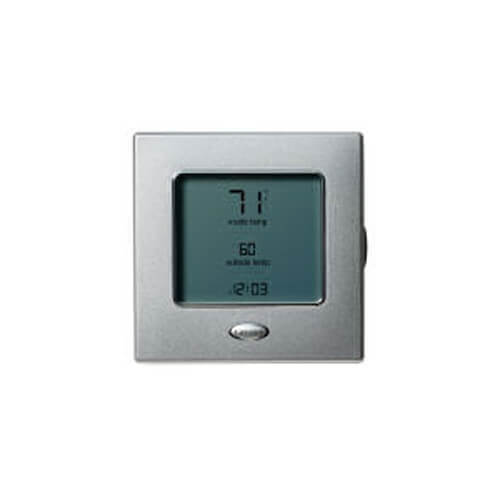
- Sleek design with simplified two-wire installation
- Proportional integral control of heating and cooling stages
- Compressor lockout sensing with automatic switchover to emergency heat for heat pumps
- Compatible with electric heat, gas heat, and heat pump operation
- Keypad lockout security
- Heating and cooling set points with up to 6 hours of occupancy override
- 4 time/temperature settings can be programmed every 24 hours
- No batteries are required, user configured settings are stored indefinitely
- Expanded back-lit display features mode and equipment status, occupancy, time of day, and outdoor air temperature
- Accessories (Not Included):
- Remore Room Sensor (ZONECCORRS01)
- Outdoor Temperature Sensor (TSTATXXSEN01-B)
Specs
| Programmability: | 7 Day Programmable |
|---|---|
| Options: | Password Lockout Auto Changeover Fan Control Works with Sensor |
| Color: | Silver |
| Stages: | 2 Heat/2 Cool |
| Power Method: | 2 Wire |
| Application: | Multi-Stage (Heat/Cool) |
| Mount: | Wall |
| Voltage: | Low voltage |
| Length: | 5.2" |
| Width: | 5.2" |
| Depth (Inches): | 1-3/10" |
| Changeover: | Auto |
| Max Temp (F): | 104°F |
| Min Temp (F): | 32°F |
| Temperature Range (F): | 32°F - 104°F |


Questions?
Product Reviews
Be the first to write a review.
Product Q&A
10 QuestionsQ: How do you restart the thermostat?
Asked by Cheryl 11 years ago
Add your answer
 Verified Reply- Supplyhouse Staff
We do not have that information, try calling Carrier.
Q: How do you display the outside temp on the monitor
Asked by Myke 12 years ago
Add your answer
Verified Reply- Supplyhouse Staffit should do it automatically, see page 5 of the manual. http://s3.supplyhouse.com/manuals/1280852588672/35557_PROD_FILE.pdf
Q: Will this work with cooling only carrier ducted split units
Asked by joy 14 years ago
Add your answer
Verified Reply- PexSupply StaffThe ductless split units use a wireless stat that comes with the unit. The edge thermostat will not work correctly with the carrier ductless split systems.
yes you have to configure when installing.
Q: No where in this manual does it tell you how to turn the fan on if you want to run it independently (i.e. No heating nor cooling). If you press the mode button (from a similar question), it never goes to "Fan" to allow it to be changed. Can the fan be turned on alone?
Asked by be88rt 14 years ago
Add your answer
Verified Reply- PexSupply StaffThe fan can run independently by itself without turning on the heating or cooling operation of the unit. The unit will have to be configured for the fan to be on constantly. The installation manual details how to configure the unit. You basically need to hold and press the 'occupied' button for 10 seconds and then highlight option 36. Option 36 will state whether the fan is on or off. Use the up and down buttons to select the setting desired. The thermostat must be kept in the occupied mode for the fan to be operational.
Q: Face plate choices for this thermostat
Asked by 15 years ago
Add your answer
Verified Reply- PexSupply StaffThis unit is only available with a silver-colored faceplate.
Q: How do you program thermostat?
Asked by 15 years ago
Add your answer
Verified Reply- PexSupply StaffPlease refer to the following manual: http://s3.pexsupply.com/manuals/1280852588672/35557_PROD_FILE.pdf
Q: How can I change the fan from "on" to "auto" for the hold setting? I had it set but pressed occ button to turn it on for a night and cant get it back to auto. Pressing mode button isnt doing anything for me.....only toggles the off/heat/cool/aux.
Asked by 15 years ago
Add your answer
Verified Reply- PexSupply StaffPlease refer to the following manual: http://s3.pexsupply.com/manuals/1280852588672/35557_PROD_FILE.pdf
Q: How do you change the Fan from On to Auto?
Asked by 15 years ago
Add your answer
Verified Reply- PexSupply StaffYou will need to use the 'Mode' button (located at the top right of the unit beneath the front cover). Press it until you reach the fan setting, and use the 'Done' button (above the up arrow on the right side) to save the changes you make.
Q: Where does one buy a replacement 2 wire pig tail (V+ & Vg) for the display?
Asked by Barry 15 years ago
Add your answer
Verified Reply- PexSupply StaffAccording to the manufacturer, these wires are not available for purchase.
Q: how to prgram assign time period to temparature
Asked by 16 years ago
Add your answer
Verified Reply- PexSupply StaffPlease view this manual: http://s3.pexsupply.com/manuals/1280852588672/35557_PROD_FILE.pdf