Apply to be a TradeMaster!
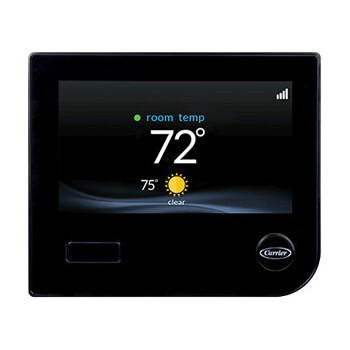
Main product image of Infinity System Control - 7 Day Programmable w/ Touch-N-Go, SYSTXCCITC01-B
Magnifying glass
Hover image to zoom

Infinity System Control - 7 Day Programmable w/ Touch-N-Go, SYSTXCCITC01-B

Brand:
Carrier
SKU:
SYSTXCCITC01-B
Rating:
(16)
Q&A:
(1)
Infinity System Control - 7 Day Programmable w/ Touch-N-Go, SYSTXCCITC01-B
Magnifying glass
Hover image to zoom
SYSTXCCITC01-B has been discontinued
Discontinued November 22, 2024
This product was discontinued by the manufacturer.
Suggested Alternative:
Infinity System Control, SYSTXCCITC01-C
Brand:
Carrier
SKU:SYSTXCCITC01-C
(2)
Order by today, receive 17 by Tuesday
VIEW ALTERNATIVE
VIEW ALTERNATIVE

Product Highlights

Product Highlight: Number of Zones
8
Product Highlight: Programmability
Programmable, 7 Day
Product Highlight: Temperature Range (F)
50°F - 90°F

Description

Note: This item requires a "G" terminal that was not available on units prior to 2008 Infinity Models.


The Infinity System Control is designed for homeowners who understand the value of precision comfort and an easy to use, intuitive user interface. With wireless connectivity, occupancy sensing capabilities and built-in smarts, the Infinity System Control puts you in command of comfort and energy savings like never before.


As part of a complete, communicating Infinity System, this smart control takes full advantage of the best technology Carrier has to offer, including Greenspeed technology and Hybrid Heat system management. Taking your comfort well beyond temperature control, the Infinity System Control can manage humidity levels, airflow, ventilation, indoor air quality and up to 8 zones, from wherever you are, with a connected smartphone or tablet. It's also compatible with Amazon Alexa.


Energy-conscious homeowners will especially appreciate the energy tracking and reporting, as well as the occupancy sensing ability that can automatically set the system back to maximize savings when you are away.


Simple, powerful and convenient, the Infinity System Control takes your comfort to the next level.


Features:

  • Full-color touch screen with photo upload capability
  • Intuitive, on-screen prompts
  • Local weather 5-day forecast
  • Occupancy sensing to automatically select comfort or energy saving system settings
  • Remote access via Internet as well as Apple and Android smartphone or tablet devices1
  • Control with Cor Home Automation system or Amazon Alexa smart skills1
  • Real-time energy use tracking
  • Ideal Humidity System management capable for exacting comfort
  • Hybrid Heat system management capable
  • Intelligent, heating- and cooling-comfort staging capable
  • Auto changeover between heating and cooling
  • Controls indoor air quality products
  • ComfortFan technology capable with four levels of "constant ON" fan speeds
  • Ventilation management capable
  • Measures and manages airflow to each zone and adjusts for quiet comfort
  • Measures percentage of airflow to each zone for best operation
  • Day-at-a-glance 7-day (wake, away, home, sleep) programming
  • Advanced smart setback for best energy savings during "away" and ramp up periods
  • One-button Touch-N-Go quick-settings-change feature
  • Simple vacation programming controls temperature and humidity
  • Up to 8-zone capability with custom naming feature
  • Choice of TrueSense dirty filter detection or fixed-schedule based filter replacement reminders
  • System maintenance reminders
  • 10-year parts limited warranty

Specs

Number of Zones:

8

Programmability:

Programmable

7 Day

Temperature Range (F):

50°F - 90°F

Humidity Control:

Yes

Wireless:

Yes

Changeover:

Auto

User Interface:

Touchscreen

Contact

Help Face
CALL US
Question? Call or text 888-757-4774
+
Help Face

Questions?

Speak with a real person who will go out of the way to help!
Call or text 888-757-4774
MondayThursday
8am7:45pm
Friday
9am7:45pm
SaturdaySunday
9am5:45pm

Response by Tue

Product Reviews

4 out of 16 reviews
75% would recommend this product
4
out of 16 Reviews
75% would recommend this product
WRITE A REVIEW
5 star
69%
4 star
6%
3 star
0%
2 star
6%
1 star
19%
WRITE A REVIEW

Most Liked Positive Review

yes

Very easy to use, I travel alot so it is good to view on the road. Great to set the temp on the way back from the airport. It has the remider to change the filters
VS

Most Liked Negative Review

VERY limited functions

For a "smart" thermostat, this sure doesn't do much. You only have four variants of temperature setting you can choose for a day. Those have to be assigned one of the four labels, home, away, wake, or sleep. For example, say you wanted "wake" to heat to 68 or cool to 72 with a high fan, "away" to heat to 66 and cool to 74 with a low fan, "home" to heat to 68 and cool to 70 with a low fan, and "sleep" to heat to 66 and cool to 70 with a medium fan. Fine so far, right? But what if you want the system to cool with a high fan during the hour the sun is on the bedroom windows? You only have those four settings to play with. You'd have to change one of those, and it is changed for every instance you use it on that day. Programming a schedule when you want something different on a different day is painstaking. EVERY. SINGLE. BIT. OF. DATA you input and save puts you back to Monday. So if you are trying to set different times and temps for when you are home on the weekend, You can click "wake" 9:00. Back to Monday. Click over to Saturday again, set the 'heat to' temp. Back to Monday. Click back over to Saturday. Set the 'cool to' temp. Back to Monday. Click back over to Saturday, set the fan speed. Back to Monday. Congrats, you spent 20 minutes programming when you want the heat and air to kick on Saturday mornings. Now you have the rest of the day to program. The photo screensaver doesn't work on mine. At. All. For such a simple function, it's a huge convoluted process that the instructions don't tell you about, and then when it fails, you click the little 'i' to see why and it says "Help Not Available". Here's some stuff they don't tell you about that. Format as FAT32. Between 8 and 32g. Create a file called "user". Name your photo "saver". Save it as a .bmp Enable display settings in the app. Every. Time. You. Retry. Curse a lot when it fails.
Showing 1-10 of 16 reviews

Yes

Yes
Jo
New york
2 years ago
Verified Buyer Icon
Verified Buyer
Was this review helpful to you?

I would not buy this product again.

I asked for help setting up my thermostat and the folks at Supply House said I needed a tech guy. They had one before the sale, but not after the sale. Would not use these folks for a source again.
k8gerk8ger
MI
4 years ago
Verified Buyer Icon
Verified Buyer
Was this review helpful to you?

VERY limited functions

For a "smart" thermostat, this sure doesn't do much. You only have four variants of temperature setting you can choose for a day. Those have to be assigned one of the four labels, home, away, wake, or sleep. For example, say you wanted "wake" to heat to 68 or cool to 72 with a high fan, "away" to heat to 66 and cool to 74 with a low fan, "home" to heat to 68 and cool to 70 with a low fan, and "sleep" to heat to 66 and cool to 70 with a medium fan. Fine so far, right? But what if you want the system to cool with a high fan during the hour the sun is on the bedroom windows? You only have those four settings to play with. You'd have to change one of those, and it is changed for every instance you use it on that day. Programming a schedule when you want something different on a different day is painstaking. EVERY. SINGLE. BIT. OF. DATA you input and save puts you back to Monday. So if you are trying to set different times and temps for when you are home on the weekend, You can click "wake" 9:00. Back to Monday. Click over to Saturday again, set the 'heat to' temp. Back to Monday. Click back over to Saturday. Set the 'cool to' temp. Back to Monday. Click back over to Saturday, set the fan speed. Back to Monday. Congrats, you spent 20 minutes programming when you want the heat and air to kick on Saturday mornings. Now you have the rest of the day to program. The photo screensaver doesn't work on mine. At. All. For such a simple function, it's a huge convoluted process that the instructions don't tell you about, and then when it fails, you click the little 'i' to see why and it says "Help Not Available". Here's some stuff they don't tell you about that. Format as FAT32. Between 8 and 32g. Create a file called "user". Name your photo "saver". Save it as a .bmp Enable display settings in the app. Every. Time. You. Retry. Curse a lot when it fails.
GadgetGirl
Eastern US
5 years ago
Was this review helpful to you?

A Perfect Fit

We needed a replacement thermostat for our Carrier cooling system and discovered that both the original thermostat and its replacement had been discontinued by the company. Only with the help of SupplyHouse were we able to determine which of the new models was the right one for us. It arrived and works like a charm.
Andy K
East Coast
5 years ago
Verified Buyer Icon
Verified Buyer
Was this review helpful to you?

Would buy from Supply House again

The first thermostat we got was used so contacted customer service and they were very understanding and wanted to make it right. They sent out another thermostat and and received next day. It was brand new and works great. Very easy to connect and setup.
Larry
Ohio
6 years ago
Verified Buyer Icon
Verified Buyer
Was this review helpful to you?

Absolutely horrible

At first approach, this thermostat control unit looks user friendly. After a while, it's nothing but frustration. Want to increase the temperature a few degrees? What should be simple is convoluted, as the systems layers constantly contradict each other. If you bump up the temperature a few degrees, the system wants to go into "hold" mode. What does that mean? Hold the heat? Hold the schedule? Hold the programming? It's never clear what is really happening when you try to make simple changes.
Drew
Indianapolis
6 years ago
Was this review helpful to you?

Excellent experience

Found the infinity touch thermostat I was looking for on SupplyHouse.com. Ordered and it was shipped and received very quickly. Excellent service and pricing. Highly recommend.
Bob T.
Summerville, SC
6 years ago
Verified Buyer Icon
Verified Buyer
Was this review helpful to you?

Carrier thermostat replacement

Agents were helpful and informative. Checked with engineers to make sure I had the right replacement thermostat. All of the features I needed were considered. Also save a lot of money order directly instead of contractor.
Bill
Pa
6 years ago
Verified Buyer Icon
Verified Buyer
Was this review helpful to you?

I would buy this again

Easy ordering and fast shipping. Arrived buy UPS exactly when they said it would. I have used this for several weeks now. It was very easy to install and to program. So far I have had no issues.
WINEROVER
Kingston, wa
6 years ago
Verified Buyer Icon
Verified Buyer
Was this review helpful to you?

A precision thermostat at its best!

We have a multi level house and they've just installed a top-of-the-line Infinity system including the Infinity thermostat. The thermostat will not disappoint as long as it is installed correctly which I presume is the issue below if you read the only one star review in this thread. I am very impressed how reactive the system is and it's multi fan/multi mode feature regulates the heat on all three levels of our home. The app is also designed very well and is very responsive. This thing runs circles around any aftermarket IOT thermostat such as Nest.
Five stars and worth it
Denver Colorado
7 years ago
Was this review helpful to you?

Product Q&A

1 Question
1 Question
ASK A QUESTION

Q: Does the Infinity Stat have a face plate with other colors?

Asked by marc 8 years ago

Add your answer

* Required Field
Verified Author and ReplyVerified Reply- SupplyHouse Staff

Marc, Not from what I see in the product literature, but a call to Carrier directly, will let you know for sure.

Was this review helpful to you?