


'/%3E%3C/svg%3E)
 --%3E %3Csvg version='1.1' id='Fill' xmlns='http://www.w3.org/2000/svg' xmlns:xlink='http://www.w3.org/1999/xlink' x='0px' y='0px' viewBox='0 0 100 100' enable-background='new 0 0 100 100' xml:space='preserve'%3E %3Cpath fill='%23F15C02' d='M79.44,0.95H20.56C9.78,0.95,0.95,9.78,0.95,20.56v58.87c0,10.79,8.82,19.61,19.61,19.61h58.87 c10.79,0,19.61-8.83,19.61-19.61V20.56C99.05,9.78,90.22,0.95,79.44,0.95z M65.38,58.24l9.38,29.58L49.69,69.78L24.5,87.82 l9.34-29.6L8.8,39.6l30.73-0.17c0,0,6.98-19.61,10-28.93c0.54,1.36,9.88,29.1,9.88,29.1H91.2L65.38,58.24z'/%3E %3C/svg%3E)
' fill='%23F15C02' d='M49 0C21.938 0 0 21.938 0 49s21.938 49 49 49 49-21.938 49-49S76.062 0 49 0m0 82.709a7.54 7.54 0 1 1 0-15.08 7.54 7.54 0 0 1 0 15.08m7.54-28.412a7.541 7.541 0 0 1-15.08 0V22.831a7.54 7.54 0 0 1 15.08 0v31.466z'/%3E%3C/svg%3E)
MANUALS (2)
 --%3E %3Csvg version='1.1' id='Half' xmlns='http://www.w3.org/2000/svg' xmlns:xlink='http://www.w3.org/1999/xlink' x='0px' y='0px' viewBox='0 0 100 100' enable-background='new 0 0 100 100' xml:space='preserve'%3E %3Cg%3E %3Cpath fill='%23F15C02' d='M30.05,70.23l3.79-12.01L8.8,39.6l30.73-0.17c0,0,6.98-19.61,10-28.93c0.54,1.36,9.88,29.1,9.88,29.1h1.58 L93.71,7.18c-3.58-3.82-8.66-6.23-14.28-6.23H20.56C9.78,0.95,0.95,9.78,0.95,20.56v58.87c0,5.41,2.22,10.32,5.79,13.88 L30.05,70.23z'/%3E %3C/g%3E %3Cpath fill='%23FBC8B4' d='M93.71,7.18L60.98,39.6H91.2L65.38,58.24l9.38,29.58L49.69,69.78L24.5,87.82l5.55-17.59L6.75,93.32 c3.55,3.54,8.44,5.73,13.82,5.73h58.87c10.79,0,19.61-8.83,19.61-19.61V20.56C99.05,15.4,97.01,10.69,93.71,7.18z'/%3E %3C/svg%3E)

Product Highlights


Description
The RedLINK Internet Gateway provides remote access to any RedLINK enabled thermostat through the internet, smart phone or tablet.
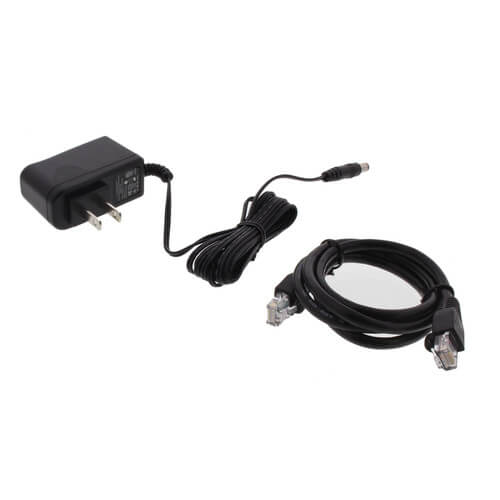
Includes: 3 Foot Ethernet Cable and Plug in Power Adapter
Features:
- RedLINK enabled to communicate with compatible wireless devices.
- Control any RedLINK enabled thermostat.
- 3 foot ethernet cable included.
- Simple installation to home or business router.
- Easily change system modes and indoor temperature through the web portal or mobile app.
- Multiple HOLD options allows modification of schedule as needed.
- High/Low temperature and humidity messaging alerts the user when the indoor conditions are too high or too low.
Specs
| Application: | Internet control of RedLINK thermostats Up to 4 Heat/2 Cool Heat Pumps |
|---|---|
| Power Method: | 24 Volt Plug In Transformer Hardwired |
| Electrical Rating: | 20 to 30 VAC |
| Electric Connection: | Screw Terminals |
| Temperature Range (F): | 32°F - 120°F |
| Voltage: | 18 to 30 Vac |


Questions?
Product Reviews
Most Liked Positive Review
Great Honeywell Thermostat
Most Liked Negative Review
 --%3E %3Csvg version='1.1' id='With-RB' xmlns='http://www.w3.org/2000/svg' xmlns:xlink='http://www.w3.org/1999/xlink' x='0px' y='0px' viewBox='0 0 100 100' enable-background='new 0 0 100 100' xml:space='preserve'%3E %3Cpath fill='%23FBC8B4' d='M79.44,0.95H20.56C9.78,0.95,0.95,9.78,0.95,20.56v58.87c0,10.79,8.82,19.61,19.61,19.61h58.87 c10.79,0,19.61-8.83,19.61-19.61V20.56C99.05,9.78,90.22,0.95,79.44,0.95z M65.38,58.24l9.38,29.58L49.69,69.78L24.5,87.82 l9.34-29.6L8.8,39.6l30.73-0.17c0,0,6.98-19.61,10-28.93c0.54,1.36,9.88,29.1,9.88,29.1H91.2L65.38,58.24z'/%3E %3C/svg%3E)
Excellent Product & Incomplete Setup Instructions
Easy to hook up

RedLINK Internet Gateway
Great Product
Easy to set up
honeywell makes and sells the best electronics
Works Well - RedLINK internet gateway
Easy to set up and shipped quickly!
Works well.
Worked as advertised
Works great
Product Q&A
11 QuestionsQ: If I am adding an additional thermostat do I have to re add ones already connected to gateway?
Asked by Phil 11 years ago
Add your answer
I don't think so - I think you can them one by one. If you having a zoning panel, you need to add any wireless zoned thermos to the zoning panel not directly to redlink.
no you should not have to re add existing thermostats that areworking in the router enviroment
Q: I am considering using this system in a commercial application. I have a building that is 30,000 sqft and has roughly 20 units controlled with separate thermostats. Can I control all thermostats with one gateway? If so what is the max distance from each thermostat that the unit will connect to?
Asked by John 11 years ago
Add your answer
Verified Reply- Supplyhouse Staff4 thermostats per gateway, we do not have the range of this unit. you should call Honeywell directly for that info.
Q: will this work with my nest thermostat also, i have 1 prestige and 1 nest
Asked by derek 11 years ago
Add your answer
No. Nest does not need an internet gateway as it connects directly to the internet via wifi. The nest and Honeywell are completely different.
The Honeywell gateway is set up to connect to Honeywell devices over a Private WiFi Network. I doubt they would work with other devices
Don't think they are compatible.
No - once you have the gateway and a nest you will manage via different apps and different sites. Once you have both thermostats online, if you really really want to manage in one application - you'll have to get a device hub that sold at staples\etc .... it'll combine a bunch of different services into one control panel.
Q: Has an Android app been developed for the Redlink Gateway?
Asked by Jack 12 years ago
Add your answer
Yes works great... Also can control from Honeywell's website.
Yes, Honeywell has the Total Connect Comfort app available for Android.
Yes. I use it everyday.
If the question is, is there an app for the thermostat, yes there is and works on Jelly bean and kitkat
Q: what is the max range between the gateway and a thermostat for wireless communication ?
Asked by none 12 years ago
Add your answer
Verified Reply- PexSupplyStaffThe range depends on the exact set up of the home, but should cover a typical home of 2500sqft.
Q: How many Thermostats can be controlled through each gateway
Asked by Don 13 years ago
Add your answer
Verified Reply- PexSupply StaffEach gateway can control up to 4 separate thermostats.
Q: Does the totalconnectcomfort account that this gateway device connects to require a paid subscription?
Asked by Matt 14 years ago
Add your answer
Verified Reply- PexSupply StaffNo, the account is free to activate once you purchase the internet gateway and there are no recurring charges to use it.
Q: Will the gateway work with the Honeywell 8000 IAQ stat?
Asked by Glenn 14 years ago
Add your answer
Verified Reply- PexSupply StaffThe Honeywell internet gateway does not work with VisionPRO thermostats. It is only compatible with RedLINK-enabled thermostats (i.e. those in the Prestige and wireless FocusPRO series).
Yes it will work with TH8110R, TH8320R and TH8321R
Q: is there any wireless interference with the Redlink Gateway THM 6000 R with other wireless devices (i.e. routers) thx
Asked by Rick 14 years ago
Add your answer
Verified Reply- PexSupply StaffNo, the gateway connects with thermostats wirelessly, but it must be plugged in to the router.
Rick, there should be no interference with other wireless devices such as wireless routers. The gateway is just another Redlink device, using the same radio frequencies as the thermostats and base unit ("EIM"). According to their literature, Honeywell Redlink uses multiple frequencies, all lower than wireless ethernet.
First configure the thermostat to connect to the Redlink Gateway. Then you can setup the Redlink Gateway interface through the Honeywell web site https://services.alarmnet.com/TotalConnectComfort/. When you first setup your gateway, you must create your interface access to your gateway by setting up your FREE account on this Honeywell web site then register your Redlink Internet Gateway device's serial number to your account so you can control your gateway through this internet based interface. If and when you decide to buy the Redlink gateway you will receive an easy to follow setup manual in the box. Once you can control your thermostat from the internet interface with your free Honeywell account, you can download the iPhone app to control your gateway from your iPhone. The mobile phone app is only available for the iPhone at this time.
Q: HOW MANY INDIVIDUAL UNITS CAN THIS CONTROL?
Asked by GUCH 15 years ago
Add your answer
Verified Reply- PexSupply StaffEach internet gateway can control up to four thermostats, although it's possible to control additional thermostats or even separate locations from the same Total Comfort Connect account.