



'/%3E%3C/svg%3E)
Hover image to zoom
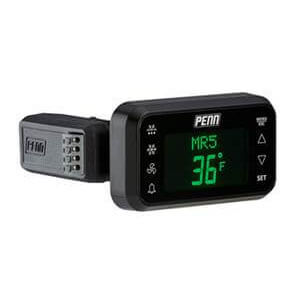
PENN MR5 Series Triple Input Panel Mount Case Controller w/ Adaptive Defrost
 --%3E %3Csvg version='1.1' id='No-RB' xmlns='http://www.w3.org/2000/svg' xmlns:xlink='http://www.w3.org/1999/xlink' x='0px' y='0px' viewBox='0 0 100 100' enable-background='new 0 0 100 100' xml:space='preserve'%3E %3Cpath fill='%23CECECE' d='M79.44,0.95H20.56C9.78,0.95,0.95,9.78,0.95,20.56v58.87c0,10.79,8.82,19.61,19.61,19.61h58.87 c10.79,0,19.61-8.83,19.61-19.61V20.56C99.05,9.78,90.22,0.95,79.44,0.95z M65.38,58.24l9.38,29.58L49.69,69.78L24.5,87.82 l9.34-29.6L8.8,39.6l30.73-0.17c0,0,6.98-19.61,10-28.93c0.54,1.36,9.88,29.1,9.88,29.1H91.2L65.38,58.24z'/%3E %3C/svg%3E)
Hover image to zoom
' fill='%23F15C02' d='M49 0C21.938 0 0 21.938 0 49s21.938 49 49 49 49-21.938 49-49S76.062 0 49 0m0 82.709a7.54 7.54 0 1 1 0-15.08 7.54 7.54 0 0 1 0 15.08m7.54-28.412a7.541 7.541 0 0 1-15.08 0V22.831a7.54 7.54 0 0 1 15.08 0v31.466z'/%3E%3C/svg%3E)
MR534AFDN-00C has been discontinued
Discontinued October 27, 2021
This product was discontinued by the manufacturer.
Description
–
The MR5 Series of panel mount case controllers are designed for refrigerated case applications such as reach-in coolers, merchandisers, display cases, and small freezers. The MR5 Controllers come loaded with features that improve the efficiency and control of your refrigerated case applications, and simplify installation, setup, monitoring, and adjustment.
The MR534 Controllers provide four relays and up to three temperature sensor inputs to control the compressor, defrost system, evaporator fans, alarm devices, and auxiliary devices on your refrigerated cases and displays. It also provides two binary inputs for monitoring alarm conditions, turning on a remote alarm light, audio signal, or any other alarm signal device. Installing the optional RS485 Network Communications Adapter on to an MR5 controller enables the controller to communicate over a Johnson Controls Verasys Building Automation System (BAS) network.
Features:
Plain Language Programming: The MR5 Controllers feature a bright, adjustable LCD that provides scrolling alphanumeric messages on the display in plain language during setup, adjustment, and normal operation. You no longer need to decipher two or three digit codes to set up your refrigerated system. First, you define your application’s hardware features, then the controller determines the required setup parameters, and displays only the setup screens necessary for your refrigerated case application. After your system is defined, the controller interface walks you through the setup menus, ranges, values, and options required for your application.
Configurable Defrost Type, Defrost Termination Type, and Defrost Schedules: The MR5 Controllers control off-cycle defrost, electric-heat defrost, or hot-gas by-pass defrost applications. The controller can terminate defrost cycles based on the defrost duration time or evaporator temperature rise. You can select a regular time-based daily defrost schedule, set up a custom time-based daily schedule, or use the advanced PENN Adaptive Defrost Algorithm to adapt the defrost schedule to meet changing load demands and environmental conditions. PENN Adaptive Defrost automatically adjusts the defrost schedule to meet the unique daily and seasonal defrost requirements of your system; providing defrost cycles at just the right time. Adaptive Defrost improves the temperature stability and efficiency of your refrigerated cases.
Configurable No-Defrost Time Periods: You can set up daily time periods, during which a defrost cycle is not permitted. This is ideal for maintaining case temperature during periods of high demand. You can set up a custom daily defrost schedule to avoid defrost cycles during periods of high cooling demand. For applications using Adaptive Defrost, you can define a regular scheduled defrost blackout period when no defrost cycle is permitted.
PENN QREV Electronic Expansion Valve and PSHC SuperHeat Controller: MR5 Controllers can connect to and monitor the status of a PENN Quick Response Expansion Valve (QREV) and Precision Super-Heat Controller (PSHC). You can also adjust the QREV superheat setpoint in the MR5 Controller interface.
Alarming and Messaging: The MR5 Controller allows you to set up and monitor a variety predefined or custom alarm conditions; including high temperature, low temperature, door open, man-in-room, refrigeration leak, and sensor failures. These alarm conditions are displayed in plain language on the MR5 LCD interface. You can set up different alarm severity levels, including alarm condition delays, and manual or automatic alarm reset. The alarm icon on the MR5 interface indicates an alarm condition and the alarm relay (MR534 only) provides for remote alarm notification.
Data Logging and Reporting: MR5 Controllers will automatically record your case temperature. This temperature data can be used to create trend data and reports showing that food or other critical products have been safely stored at the required temperatures. If a high or low temperature alarm condition is reached, the MR5 can record the start time and duration that the temperature was out of range.
Download and Upload MR5 Configuration Files, and Update Firmware Versions: You can connect the MR5 Controller’s communications port to a USB drive to download and upload custom configuration files from a configured MR5 Controller; allowing you to clone MR5 configuration files quickly and easily from one controller to other controllers. You can also update a controller’s firmware version to new and enhanced firmware versions as they become available.
BAS Network Communications Capability: The MR5 Controller incorporates Johnson Controls SMART equipment technology. After you connect the ADPT-MR5-RS485 Network Communications Adapter, you can easily integrate the MR5 Controller onto a Verasys BAS network. And use the Verasys BAS to remotely monitor and control the MR5 via a variety of Verasys enabled devices; including smart phones, tablets, laptops, PCs and workstations. When you connect to a Verasys network, the SMART equipment technology also provides data logging, trend recording, and diagnostic capabilities.
Panel Mounting: The MR5 Controllers fit into the industry standard panel opening to make controller conversion or adoption simple and easy. The network communications adapter slides on the side of the MR5 controller for secure mounting, and the adapter wiring harness plugs into the back of the controller.
The MR534 Controllers provide four relays and up to three temperature sensor inputs to control the compressor, defrost system, evaporator fans, alarm devices, and auxiliary devices on your refrigerated cases and displays. It also provides two binary inputs for monitoring alarm conditions, turning on a remote alarm light, audio signal, or any other alarm signal device. Installing the optional RS485 Network Communications Adapter on to an MR5 controller enables the controller to communicate over a Johnson Controls Verasys Building Automation System (BAS) network.
Features:
Specs
–
| Product Type: | Controller |
|---|---|
| Type: | Triple Input Control |
| Features: | Defrost Control |


Questions?
Speak with a real person who will go out of the way to help!
Call or text 888-757-4774
Monday – Thursday
8am–7:45pm
Friday
9am–7:45pm
Saturday – Sunday
9am–5:45pm