



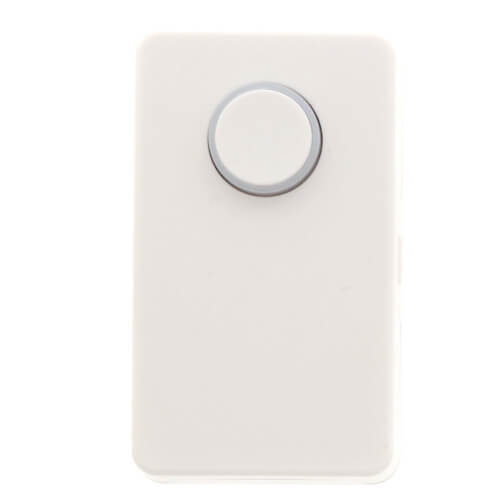
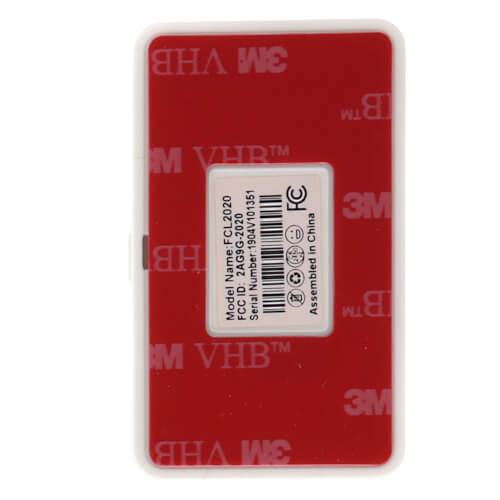
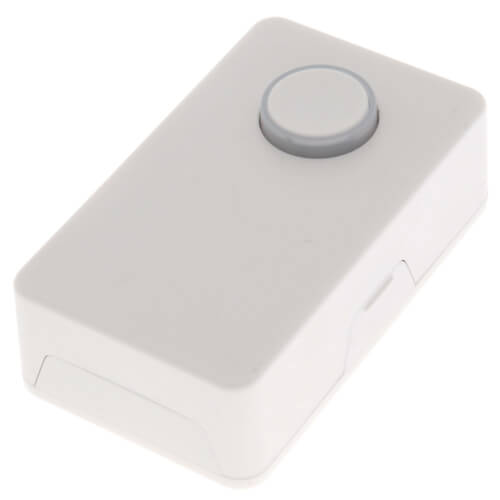
'/%3E%3C/svg%3E)
Hover image to zoom
 --%3E %3Csvg version='1.1' id='Fill' xmlns='http://www.w3.org/2000/svg' xmlns:xlink='http://www.w3.org/1999/xlink' x='0px' y='0px' viewBox='0 0 100 100' enable-background='new 0 0 100 100' xml:space='preserve'%3E %3Cpath fill='%23F15C02' d='M79.44,0.95H20.56C9.78,0.95,0.95,9.78,0.95,20.56v58.87c0,10.79,8.82,19.61,19.61,19.61h58.87 c10.79,0,19.61-8.83,19.61-19.61V20.56C99.05,9.78,90.22,0.95,79.44,0.95z M65.38,58.24l9.38,29.58L49.69,69.78L24.5,87.82 l9.34-29.6L8.8,39.6l30.73-0.17c0,0,6.98-19.61,10-28.93c0.54,1.36,9.88,29.1,9.88,29.1H91.2L65.38,58.24z'/%3E %3C/svg%3E)
Hover image to zoom
' fill='%23F15C02' d='M49 0C21.938 0 0 21.938 0 49s21.938 49 49 49 49-21.938 49-49S76.062 0 49 0m0 82.709a7.54 7.54 0 1 1 0-15.08 7.54 7.54 0 0 1 0 15.08m7.54-28.412a7.541 7.541 0 0 1-15.08 0V22.831a7.54 7.54 0 0 1 15.08 0v31.466z'/%3E%3C/svg%3E)
RWMPB01 has been discontinued
Discontinued April 24, 2024
This product was discontinued by the manufacturer.
MANUALS (2)
Direct Replacement:
 --%3E %3Csvg version='1.1' id='With-RB' xmlns='http://www.w3.org/2000/svg' xmlns:xlink='http://www.w3.org/1999/xlink' x='0px' y='0px' viewBox='0 0 100 100' enable-background='new 0 0 100 100' xml:space='preserve'%3E %3Cpath fill='%23FBC8B4' d='M79.44,0.95H20.56C9.78,0.95,0.95,9.78,0.95,20.56v58.87c0,10.79,8.82,19.61,19.61,19.61h58.87 c10.79,0,19.61-8.83,19.61-19.61V20.56C99.05,9.78,90.22,0.95,79.44,0.95z M65.38,58.24l9.38,29.58L49.69,69.78L24.5,87.82 l9.34-29.6L8.8,39.6l30.73-0.17c0,0,6.98-19.61,10-28.93c0.54,1.36,9.88,29.1,9.88,29.1H91.2L65.38,58.24z'/%3E %3C/svg%3E)

Description
–
For Use with the RWM101 Control-R Wi-Fi Module


Questions?
Speak with a real person who will go out of the way to help!
Call or text 888-757-4774
Monday – Thursday
8am–7:45pm
Friday
9am–7:45pm
Saturday – Sunday
9am–5:45pm
You May Also Need
Product Reviews
4.85 out of 26 reviews
100% would recommend this product
5 star
88%
4 star
8%
3 star
4%
2 star
0%
1 star
0%
Most Liked Positive Review
RWMPB01 Set-Up
Linking the Push-Button to the WiFi unit (that you must have for the Push-Button to work) was a bit more involved than I expected, due to the out-of-date instructions included with the unit. After talking to the folks at Rinnai, who are just the best, here are the steps:
1. If you are unsure about the strength of the included batteries, replace them.
2. Push each battery about 1/3 the way into the holder, and while holding down the push-button, insert each battery fulling into its holder.
3. Reinstall the back case. Note that it is "keyed" so it only goes on one way. There is a small micro-switch that will be depressed when the case is reinstalled. This puts the unit into set-up mode.
4. DO NOT PRESS the push-button unitl you are ready to link to the WiFi unit.
5. On the side of the WiFi unit, press and hold the "Connect" button. It will first turn red for about 10 seconds, then will start blinking green. This means it is in set-up mode.
6. Hold the Push-Button unit within 2 inches of the WiFi box, and press and hold the button on the front of Push-Button unit. The button on the Push-Button will blink blue 3 times. Continue to hold the button down until the WiFi box starts a rapid green blink. Release the button on the push-button unit.
7. If your Rinnai WiFi box is connected to the internet, it will then return to a blue light.
8. If you do not get a connection, retry step 6. If you fail, then the WiFi box will continue to blink green but will return to blue after a few minutes.
9. If you fail, then remove the cover of the push-button unit and remove the batteries. Hold down the front button until it blinks blue 3 times. Then repeat step from step 2.
If you are using the new "Rinnai Central" App, and you have a recirculation schedule set, then wait until the water heater is not operating (e.g. at the end of your daily schedule). Check "Status." Circulation should be "false." Push the button on the push-button, for a "true" status
VS
Most Liked Negative Review
Mixed Results
I get good service from Supply House. But (as before) only some of the Rinnai buttons work when they arrive.
Showing 1-10 of 26 reviews
Great service and useful product
Had difficulty getting the first button to pair with the Rennai Control-R, so worked thru Rennai's customer support and they felt the button might be defective. Passed this on to SupplyHouse and they got me a new button within days. Have it working now and it is very slick. It starts a hot water recirculation loop to a distant part of your house so you don't have to open a faucet for 3-4 minutes to get hot water. With a simple push of button, no more wasted water! This can also be accomplished with a smart phone, but this is so much simpler and better.
TJT
Lindstrom MN
2 years ago

Verified Buyer
Was this review helpful to you?
Buy this if you have a Rannai tankless water heater
It works well and saves water, by circulating the hot water.one for every faucet, shower and clothes washer
H2O
Colorado
2 years ago
Verified Buyer
Was this review helpful to you?
Good item
Quick delivery
Joe
Lincoln Ca
2 years ago
Verified Buyer
Was this review helpful to you?
PSA...This button works with certain HWHs and plumbing conf
Please note that when you purchase this, in order to recirculate hot water in your Rinnai, you will need a particular model of their HWH. If you don't have the HWH that comes out of the box with an internal pump you'll have to buy one and have it installed. You might also need a return line. It's not the product's fault it's Rinnai's for not giving the purchaser a check list to ensure the product will work with their configuration before they purchase it.
Gulf Coastin
Florida
2 years ago
Verified Buyer
Was this review helpful to you?
Works
Can't say to much about a "Button" except that it works (starts "recirculation pump" when pushed). Easy to pair to wireless module and to replace batteries (requires 2-2450 batteries). I purchased 2 "Buttons" for my house. While I do recommend the use of a remote "Button" (I get hot water within 5-10 seconds), the price is a little high for a "Button".
Fsoetekouw
Fayetteville, T
2 years ago
Verified Buyer
Was this review helpful to you?
RWMPB01 Set-Up
Linking the Push-Button to the WiFi unit (that you must have for the Push-Button to work) was a bit more involved than I expected, due to the out-of-date instructions included with the unit. After talking to the folks at Rinnai, who are just the best, here are the steps:
1. If you are unsure about the strength of the included batteries, replace them.
2. Push each battery about 1/3 the way into the holder, and while holding down the push-button, insert each battery fulling into its holder.
3. Reinstall the back case. Note that it is "keyed" so it only goes on one way. There is a small micro-switch that will be depressed when the case is reinstalled. This puts the unit into set-up mode.
4. DO NOT PRESS the push-button unitl you are ready to link to the WiFi unit.
5. On the side of the WiFi unit, press and hold the "Connect" button. It will first turn red for about 10 seconds, then will start blinking green. This means it is in set-up mode.
6. Hold the Push-Button unit within 2 inches of the WiFi box, and press and hold the button on the front of Push-Button unit. The button on the Push-Button will blink blue 3 times. Continue to hold the button down until the WiFi box starts a rapid green blink. Release the button on the push-button unit.
7. If your Rinnai WiFi box is connected to the internet, it will then return to a blue light.
8. If you do not get a connection, retry step 6. If you fail, then the WiFi box will continue to blink green but will return to blue after a few minutes.
9. If you fail, then remove the cover of the push-button unit and remove the batteries. Hold down the front button until it blinks blue 3 times. Then repeat step from step 2.
If you are using the new "Rinnai Central" App, and you have a recirculation schedule set, then wait until the water heater is not operating (e.g. at the end of your daily schedule). Check "Status." Circulation should be "false." Push the button on the push-button, for a "true" status
Chuck
Franklin, TN
2 years ago
Was this review helpful to you?
Rinnai tankless recirculator remote
This product is very temperamental. The units supplied by Rinnai did not work well. Had to get a replacement from the manufacturer. Worked better, but they tend to lose the pairing and have to be re paired occasionally. Aftermarket purchase like from Supply House has worked so far. But I am sure its will need re pairing occasionally as its all the same product, just may be lemons in the bunch that don't work well. Also, you have to be fairly close to the heater or it won't activate the recirculator. Walls and distance is the problem. Anyway, its the only stand alone product thats available, so I have to be using this product . Or you could use your cell phone I think, but I don't want my heater to be connected to my phone. Too many things tied to your phone, and you're helpless when you lose your phone or misplace it. Can't even take a hot shower!
R
honolulu HI
3 years ago
Verified Buyer
Was this review helpful to you?
These were just what we needed!
We have a new Rinnai Tankless water heater. We also have the Wifi module that attaches to the side so we can schedule when to recirculate and deliver hot water. We also have one spouse who doesn't like to use his phone for such and this spouse who travels a bit leaving him at home. So push buttons to the rescue. Just push the button 2 or 3 minutes before needing, then turn the water on and there is hot water. We have basically stopped setting any schedules as it is just the two of us and we don't have set schedules. We have one in the kitchen, one in the main bathroom and the third one in a guest bathroom. Perfect. Hoping we don't have trouble with batteries like some have said, but feel good with this setup.
GailZ
Little Rock
3 years ago
Verified Buyer
Was this review helpful to you?
Wireless pusg=h button for Control-R module
Works great.
Push the button, wait about 1 minute for the water to circulate through the system, then turn on the faucet in the tub or shower and BAM, in seconds the hot water is there. I have a particularly long run from the water heater to the 2 showers in my home. Best investment I have ever made to save water and fuel.
Must have a Control-R Module. Won't work with regular module.
Farris47
Jacksonville, FL
3 years ago
Verified Buyer
Was this review helpful to you?
Strongly Recommended
I can't imagine having a recirculation system without having one of these buttons in each bathroom and in the kitchen. It is especially important for the comfort of house guests or other family members who are not on a regular schedule. Also, it is extremely easy to link it to the Control-R module.
Ed
Lewes, DE
3 years ago
Verified Buyer
Was this review helpful to you?
Product Q&A
1 Question1 Question
Q: does the push button use bluetooth or wifi to communicate with the control r module?
Asked by Rob 2 years ago
Add your answer
Verified Reply- SupplyHouseHello Rob, thanks for writing in. It uses Wifi to communicate with the control module.
Was this review helpful to you?