



'/%3E%3C/svg%3E)
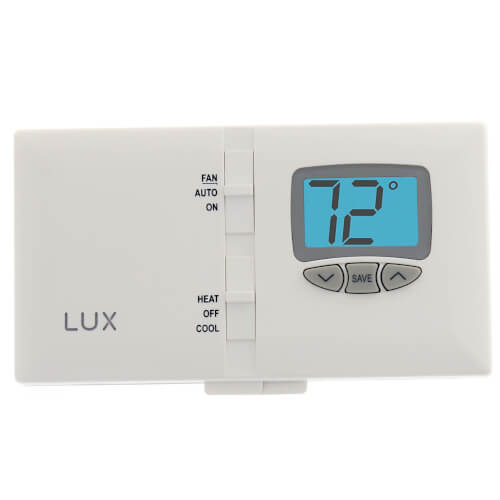
Non-Programmable Smart Temp Heating & Cooling Digital Thermostat (1 Heat / 1 Cool)
 --%3E %3Csvg version='1.1' id='Fill' xmlns='http://www.w3.org/2000/svg' xmlns:xlink='http://www.w3.org/1999/xlink' x='0px' y='0px' viewBox='0 0 100 100' enable-background='new 0 0 100 100' xml:space='preserve'%3E %3Cpath fill='%23F15C02' d='M79.44,0.95H20.56C9.78,0.95,0.95,9.78,0.95,20.56v58.87c0,10.79,8.82,19.61,19.61,19.61h58.87 c10.79,0,19.61-8.83,19.61-19.61V20.56C99.05,9.78,90.22,0.95,79.44,0.95z M65.38,58.24l9.38,29.58L49.69,69.78L24.5,87.82 l9.34-29.6L8.8,39.6l30.73-0.17c0,0,6.98-19.61,10-28.93c0.54,1.36,9.88,29.1,9.88,29.1H91.2L65.38,58.24z'/%3E %3C/svg%3E)
 --%3E %3Csvg version='1.1' id='Half' xmlns='http://www.w3.org/2000/svg' xmlns:xlink='http://www.w3.org/1999/xlink' x='0px' y='0px' viewBox='0 0 100 100' enable-background='new 0 0 100 100' xml:space='preserve'%3E %3Cg%3E %3Cpath fill='%23F15C02' d='M30.05,70.23l3.79-12.01L8.8,39.6l30.73-0.17c0,0,6.98-19.61,10-28.93c0.54,1.36,9.88,29.1,9.88,29.1h1.58 L93.71,7.18c-3.58-3.82-8.66-6.23-14.28-6.23H20.56C9.78,0.95,0.95,9.78,0.95,20.56v58.87c0,5.41,2.22,10.32,5.79,13.88 L30.05,70.23z'/%3E %3C/g%3E %3Cpath fill='%23FBC8B4' d='M93.71,7.18L60.98,39.6H91.2L65.38,58.24l9.38,29.58L49.69,69.78L24.5,87.82l5.55-17.59L6.75,93.32 c3.55,3.54,8.44,5.73,13.82,5.73h58.87c10.79,0,19.61-8.83,19.61-19.61V20.56C99.05,15.4,97.01,10.69,93.71,7.18z'/%3E %3C/svg%3E)
' fill='%23F15C02' d='M49 0C21.938 0 0 21.938 0 49s21.938 49 49 49 49-21.938 49-49S76.062 0 49 0m0 82.709a7.54 7.54 0 1 1 0-15.08 7.54 7.54 0 0 1 0 15.08m7.54-28.412a7.541 7.541 0 0 1-15.08 0V22.831a7.54 7.54 0 0 1 15.08 0v31.466z'/%3E%3C/svg%3E)
MANUALS (3)
Product Highlights


Description
Features:
- Large, Lighted Digital Display
- Electronic Accuracy
- Save Energy Button
- Adjustable Temperature Swing (For Better Comfort Control)
- Fahrenheit/Celsius Switchable
- Battery or System Powered (For Compatibility with More Systems)
- On Screen Low Battery Indicator
- Decorative Wallplate Available
- Most 24V Heating and A/C Systems
- 1 Stage Heat/1 Stage Cool: Gas, Oil, Electric, or Single Stage Heat Pump Systems
- 2 Wire Heat Only Hydronic Systems (Hot Water Baseboard & Radiator)
- Millivolt Systems (Wall Heaters / Furnaces & Gas Fireplaces)
- Multi-Stage Heat Pumps
- 3 Wire Hydronic Systems
- Line Voltage Systems (120/240V)
Specs
| Application: | Heat Pump Single-Stage (Heat/Cool) |
|---|---|
| Stages: | 1 Heat/1 Cool |
| Programmability: | Non-Programmable |
| User Interface: | Push Button |
| Mount: | Horizontal |
| Options: | Fan Control |
| Power Method: | Battery |
| Voltage: | 24V |
| Temperature Range (F): | 45°F - 90°F |
| Warranty: | 1 Year |


Questions?
Compare Similar Products

Single-Stage (Heat/Cool)
Product Reviews
The updated DMH110 . . .

yes
 --%3E %3Csvg version='1.1' id='With-RB' xmlns='http://www.w3.org/2000/svg' xmlns:xlink='http://www.w3.org/1999/xlink' x='0px' y='0px' viewBox='0 0 100 100' enable-background='new 0 0 100 100' xml:space='preserve'%3E %3Cpath fill='%23FBC8B4' d='M79.44,0.95H20.56C9.78,0.95,0.95,9.78,0.95,20.56v58.87c0,10.79,8.82,19.61,19.61,19.61h58.87 c10.79,0,19.61-8.83,19.61-19.61V20.56C99.05,9.78,90.22,0.95,79.44,0.95z M65.38,58.24l9.38,29.58L49.69,69.78L24.5,87.82 l9.34-29.6L8.8,39.6l30.73-0.17c0,0,6.98-19.61,10-28.93c0.54,1.36,9.88,29.1,9.88,29.1H91.2L65.38,58.24z'/%3E %3C/svg%3E)
good price, works well, small flaw
Lux t stat
this has been a good product so far, only time will tell.
Does well what it is suppose to
Product Q&A
5 QuestionsQ: How do you set the thermostat to the temperature you want. I have tried the set button and it doesn't stay at that temperature. Please advice. Thank you.
Asked by Pat 11 years ago
Add your answer
The set button can be misleading. When you are leaving the house and you want the temperature turned down you push the set button and it lowers the temp 5 degrees. When you come back you push it again and temperature goes back to where it was before. They should have called it the set back button. To set a temperature you use the up and down arrows to select the temp and then leave it there. In a moment the display will switch to the current room temp and begin heating or not heating depending on where you adjusted the temp to.
Q: How do I change my LUX thermastat from celicus to fahernhieght.It does'nt have a menu button on it.
Asked by Donna 14 years ago
Add your answer
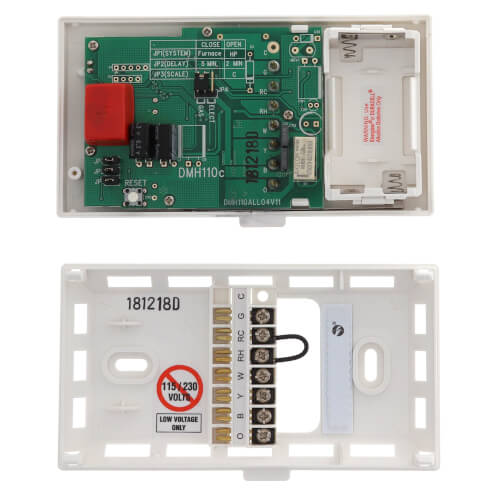
Verified Reply- PexSupply StaffJP2 - FAHRENHEIT OR CELSIUS DISPLAY FORMAT This setting controls whether the temperature is displayed in degrees °F or °C on the LCD screen. You can find this in the manual: http://s3.pexsupply.com/manuals/1273869615170/30493_PROD_FILE.pdf
Q: Should thermostat be on the Auto position or on On when Air conditioner is on?
Asked by 15 years ago
Add your answer
Verified Reply- PexSupply StaffIn the "Auto" position your fan will only turn on when your cooling system is on. In the "On" position, the fan will run constantly.
Q: how to ajust swing temp.
Asked by ed 16 years ago
Add your answer
Verified Reply- PexSupply StaffJP3 - TEMPERATURE SWING SETTING: This setting changes the size of the temperature control band with respect to the set point. The larger the swing setting, the larger the temperature control range will be. Conversely, the smaller the swing setting, the smaller (or tighter) the temperature control range will be. This setting is called NARROW and WIDE. This information can be found in the manual under "Setup Options" (Manual is located at the bottom of the product page)
Q: Instruction manual
Asked by 16 years ago
Add your answer
Verified Reply- PexSupply StaffHere are the installation and operating instructions: http://s3.pexsupply.com/manuals/1273869615170/30493_PROD_FILE.pdf