


'/%3E%3C/svg%3E)
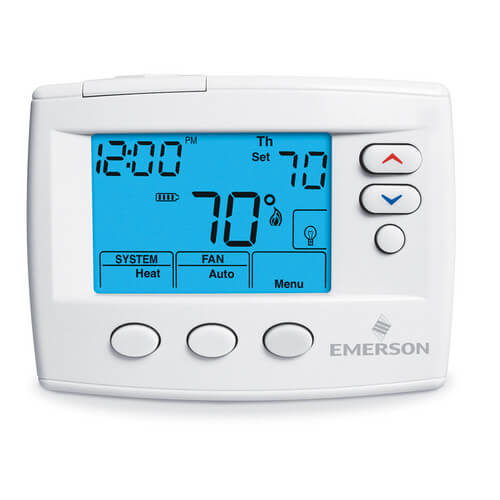
80 Series Non-Programmable, 1H/1C, Blue Digital Thermostat
 --%3E %3Csvg version='1.1' id='Fill' xmlns='http://www.w3.org/2000/svg' xmlns:xlink='http://www.w3.org/1999/xlink' x='0px' y='0px' viewBox='0 0 100 100' enable-background='new 0 0 100 100' xml:space='preserve'%3E %3Cpath fill='%23F15C02' d='M79.44,0.95H20.56C9.78,0.95,0.95,9.78,0.95,20.56v58.87c0,10.79,8.82,19.61,19.61,19.61h58.87 c10.79,0,19.61-8.83,19.61-19.61V20.56C99.05,9.78,90.22,0.95,79.44,0.95z M65.38,58.24l9.38,29.58L49.69,69.78L24.5,87.82 l9.34-29.6L8.8,39.6l30.73-0.17c0,0,6.98-19.61,10-28.93c0.54,1.36,9.88,29.1,9.88,29.1H91.2L65.38,58.24z'/%3E %3C/svg%3E)
 --%3E %3Csvg version='1.1' id='Half' xmlns='http://www.w3.org/2000/svg' xmlns:xlink='http://www.w3.org/1999/xlink' x='0px' y='0px' viewBox='0 0 100 100' enable-background='new 0 0 100 100' xml:space='preserve'%3E %3Cg%3E %3Cpath fill='%23F15C02' d='M30.05,70.23l3.79-12.01L8.8,39.6l30.73-0.17c0,0,6.98-19.61,10-28.93c0.54,1.36,9.88,29.1,9.88,29.1h1.58 L93.71,7.18c-3.58-3.82-8.66-6.23-14.28-6.23H20.56C9.78,0.95,0.95,9.78,0.95,20.56v58.87c0,5.41,2.22,10.32,5.79,13.88 L30.05,70.23z'/%3E %3C/g%3E %3Cpath fill='%23FBC8B4' d='M93.71,7.18L60.98,39.6H91.2L65.38,58.24l9.38,29.58L49.69,69.78L24.5,87.82l5.55-17.59L6.75,93.32 c3.55,3.54,8.44,5.73,13.82,5.73h58.87c10.79,0,19.61-8.83,19.61-19.61V20.56C99.05,15.4,97.01,10.69,93.71,7.18z'/%3E %3C/svg%3E)
' fill='%23F15C02' d='M49 0C21.938 0 0 21.938 0 49s21.938 49 49 49 49-21.938 49-49S76.062 0 49 0m0 82.709a7.54 7.54 0 1 1 0-15.08 7.54 7.54 0 0 1 0 15.08m7.54-28.412a7.541 7.541 0 0 1-15.08 0V22.831a7.54 7.54 0 0 1 15.08 0v31.466z'/%3E%3C/svg%3E)
MANUALS (5)

Product Highlights


Description
- Available in Universal (Single Stage, Multi-Stage, Heat pump) or Single Stage Models.
- Programmable 7- Day, 5/1/1 Day, 5/2 Day, 0-Day or Non-Programmable.
- Gas, Oil, Electric, mV and 2 or 3-Wire Zone compatible.
- Automatic Heat/Cool changeover option.
- Keypad lockout and setpoint temperature limit options.
- Dual power - hardwired and/or battery powered.
- Fits vertical or horizontal junction box.
- Air filter change indicator option.
- Spanish language display models available.
Specs
| Amperage: | 1.5 |
|---|---|
| Application: | Heat Pump Single-Stage (Heat/Cool) |
| Stages: | 1 Heat/1 Cool |
| Programmability: | Non-Programmable |
| User Interface: | Push Button |
| Mount: | Horizontal |
| Options: | Large Display Auto Changeover |
| Power Method: | Hardwired Battery |
| Changeover: | Auto |
| Temperature Range (F): | 45°F - 90°F |
| Voltage: | Low voltage 24V |
| Wattage: | 1.5 to 45 |
| Wiring: | Rc Y Rh W C O/B |
| Color: | White |
| Height (Inches): | 3.5" |
| Width (Inches): | 4-1/2" |
| Depth (Inches): | 1-1/10" |


Questions?
Compare Similar Products
Single-Stage (Heat/Cool)
Battery
Product Reviews
Most Liked Positive Review
 --%3E %3Csvg version='1.1' id='With-RB' xmlns='http://www.w3.org/2000/svg' xmlns:xlink='http://www.w3.org/1999/xlink' x='0px' y='0px' viewBox='0 0 100 100' enable-background='new 0 0 100 100' xml:space='preserve'%3E %3Cpath fill='%23FBC8B4' d='M79.44,0.95H20.56C9.78,0.95,0.95,9.78,0.95,20.56v58.87c0,10.79,8.82,19.61,19.61,19.61h58.87 c10.79,0,19.61-8.83,19.61-19.61V20.56C99.05,9.78,90.22,0.95,79.44,0.95z M65.38,58.24l9.38,29.58L49.69,69.78L24.5,87.82 l9.34-29.6L8.8,39.6l30.73-0.17c0,0,6.98-19.61,10-28.93c0.54,1.36,9.88,29.1,9.88,29.1H91.2L65.38,58.24z'/%3E %3C/svg%3E)
Very nice thermostat
Most Liked Negative Review
typical discontinued and replacement is not an exact
typical discontinued and replacement is not an exact
Would buy this product again

The product worked perfect for my application
Tstat
simple and reliable
Very Satisfied
Great Product
Works on hydronic baseboard heating
GREAT PRODUCT
Good basic thermostat
Product Q&A
8 QuestionsQ: Does it come with a wallplate or do I have to purchase one separately? If yes, is it F61-2634?
Asked by Chloe 10 years ago
Add your answer
Verified Reply- SupplyHouse StaffA wall plate is included.
Q: how can I change the battery
Asked by maria 11 years ago
Add your answer
Verified Reply- SupplyHouse StaffHere is a link to a screenshot of the instructions for changing a battery: http://screencast.com/t/saNq5NwCDTFd
On top left corner you see an arrow facing you, push down and out.
Q: How do i turn off the run schedules?
Asked by jackie 11 years ago
Add your answer
Verified Reply- SupplyHouse StaffThe Hold button allows you to override programming. The temperature will stay at this setting until program is run again.
Q: can the back light be turned off or does it need to remain on all the time?
Asked by William 11 years ago
Add your answer
On mine the light only comes on when you change the settings or if the temperature calls for the furnace to operate. Then the back light turns off after a minute or so Sent from my iPhone
Backlight turns off a few dseconds
Backlight has automatic timeout and will turn off on it's own.
You can select that. See owners manual. There are several things you can choose.
The backlight is off until you press a button. Then it stays on only for a few seconds before turning off again. I think it comes on also when the heat/AC switches on or off for a few seconds as well.
Q: I have a two wire (R & W) system. I assume I connect the R wire to the Rh and the W wire to the W connector. Do I disconnect the jumper or leave it connected?
Asked by Vaughn 14 years ago
Add your answer
I have a 3 wire system. My green wire goes to O/B. The white wire goes to W (Heat relay). And the red wire goes to RH (Power for heating). So I assume on a 2 wire system, the white wire goes to W and the red wire goes to RH. Regarding the jumper, I was unable to find anything in my literature so I suggest leave it connected. David
Doesn't matter - the "cooling" part of the thermostat(uses Rc as its 24 V feed) is apparently not being used.
Q: what is the menu button for? I pressed mine & nothing happens.
Asked by 15 years ago
Add your answer
Verified Reply- PexSupply StaffIn order for the installer setup functions to appear, you must hold down the Menu button for at least 5 seconds. For more information, refer to the Installation Guide below. http://s3.pexsupply.com/manuals/1249544587127/White_Rodgers_1F86-0471_Instructions.pdf
Q: I have an old (42 yrs) Honeywell thermostat, that I would like to replace with something easier to read that shows current room temp, and a setting for desired temp. No A/c involved. Heat only.
Asked by Ralph 15 years ago
Add your answer
Verified Reply- PexSupply StaffThis thermostat would be able to do those things for you.
Q: howe to prog, time
Asked by heman patel 16 years ago
Add your answer
Verified Reply- PexSupply StaffPress menu, then press the time button once. You then use the up and down arrows to set the correct hour then hit the time button, then do the same for minutes, and day of the week. Hit the run button to exit the menu.