



'/%3E%3C/svg%3E)
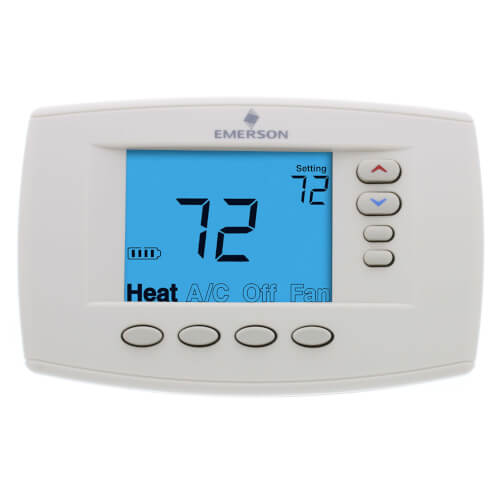
Programmable, 4H/2C, Easy Reader Blue Digital Thermostat
 --%3E %3Csvg version='1.1' id='Fill' xmlns='http://www.w3.org/2000/svg' xmlns:xlink='http://www.w3.org/1999/xlink' x='0px' y='0px' viewBox='0 0 100 100' enable-background='new 0 0 100 100' xml:space='preserve'%3E %3Cpath fill='%23F15C02' d='M79.44,0.95H20.56C9.78,0.95,0.95,9.78,0.95,20.56v58.87c0,10.79,8.82,19.61,19.61,19.61h58.87 c10.79,0,19.61-8.83,19.61-19.61V20.56C99.05,9.78,90.22,0.95,79.44,0.95z M65.38,58.24l9.38,29.58L49.69,69.78L24.5,87.82 l9.34-29.6L8.8,39.6l30.73-0.17c0,0,6.98-19.61,10-28.93c0.54,1.36,9.88,29.1,9.88,29.1H91.2L65.38,58.24z'/%3E %3C/svg%3E)
 --%3E %3Csvg version='1.1' id='Half' xmlns='http://www.w3.org/2000/svg' xmlns:xlink='http://www.w3.org/1999/xlink' x='0px' y='0px' viewBox='0 0 100 100' enable-background='new 0 0 100 100' xml:space='preserve'%3E %3Cg%3E %3Cpath fill='%23F15C02' d='M30.05,70.23l3.79-12.01L8.8,39.6l30.73-0.17c0,0,6.98-19.61,10-28.93c0.54,1.36,9.88,29.1,9.88,29.1h1.58 L93.71,7.18c-3.58-3.82-8.66-6.23-14.28-6.23H20.56C9.78,0.95,0.95,9.78,0.95,20.56v58.87c0,5.41,2.22,10.32,5.79,13.88 L30.05,70.23z'/%3E %3C/g%3E %3Cpath fill='%23FBC8B4' d='M93.71,7.18L60.98,39.6H91.2L65.38,58.24l9.38,29.58L49.69,69.78L24.5,87.82l5.55-17.59L6.75,93.32 c3.55,3.54,8.44,5.73,13.82,5.73h58.87c10.79,0,19.61-8.83,19.61-19.61V20.56C99.05,15.4,97.01,10.69,93.71,7.18z'/%3E %3C/svg%3E)


MANUALS (3)
'/%3E%3C/svg%3E)
Product Highlights


Description
Product Features
- One-touch mode buttons to set the temperature or selectable 7-day program (installer selectable)
- Patented pre-programmed schedule simplifies time and temperature programming
- 5-year warranty
- Meets ENERGY STAR specifications
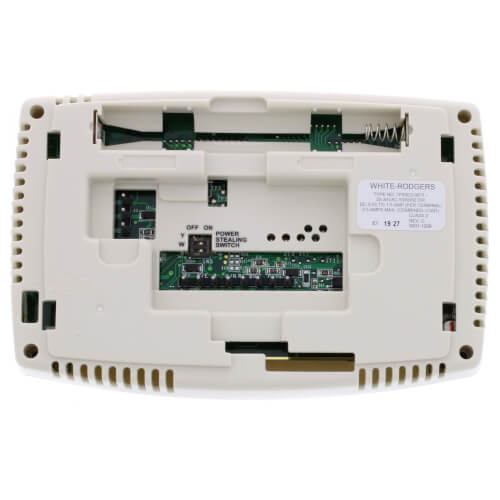
- Choice of battery-powered with optional power stealing assist or hardwired with battery backup
- Selectable Energy Management Recovery
- Meets California Building Code, Title 24
- Permanent program retention during power loss
- Indefinite set point hold or temporary temperature override
- Temporary temperature override?will override program for two hours
- Furnace filter change reminder
- Maintains room temperature to within +/-1° F
- Room temperature display can be re-calibrated up to +/-4° F
- Temperature Range: 45-90 F
- Energy-saving selectable 7-day programmable feature automatically adjusts the temperature to different times of the day
Additionally, according to the Department of Energy, you can save up to 30% on your heating and cooling costs when the thermostat is used in the programmable mode. These savings can average up to $250 per year.
Specs
| Amperage: | 2.5 |
|---|---|
| Application: | 4 Heat/2 Cool Heat Pump Multi-Stage (Heat/Cool) |
| Programmability: | Programmable 7 Day |
| User Interface: | Push Button |
| Mount: | Horizontal |
| Floor Sensor Compatible: | No |
| Options: | Large Display |
| Power Method: | Power Stealing Hardwired Battery |
| Changeover: | Manual |
| Temperature Range (F): | 45°F - 99°F |
| Voltage: | Low voltage 24V |
| Wattage: | 30 to 75 |
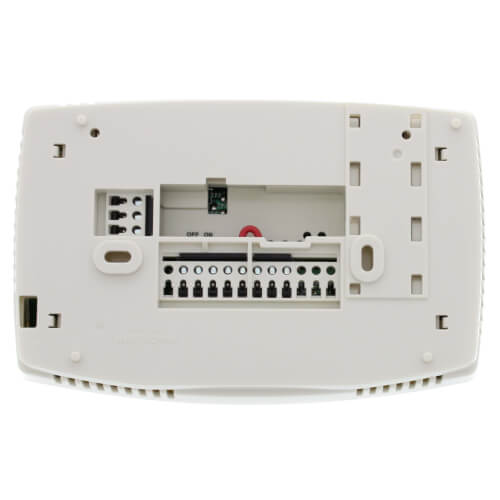
| Wiring: | G Y W/E O/B Rc 6 Y2 W2 L Rh C |
| Color: | White |
| Height: | 4-1/5" |
| Width: | 6-2/5" |
| Depth (Inches): | 1-7/10" |
| Humidity Control: | No |
| Wireless: | No |


Questions?
Compare Similar Products
Heat Pump
Multi-Stage (Heat/Cool)
7 Day
You May Also Need
Product Reviews
Most Liked Positive Review
I would absolutely buy this product again.
Most Liked Negative Review
 --%3E %3Csvg version='1.1' id='With-RB' xmlns='http://www.w3.org/2000/svg' xmlns:xlink='http://www.w3.org/1999/xlink' x='0px' y='0px' viewBox='0 0 100 100' enable-background='new 0 0 100 100' xml:space='preserve'%3E %3Cpath fill='%23FBC8B4' d='M79.44,0.95H20.56C9.78,0.95,0.95,9.78,0.95,20.56v58.87c0,10.79,8.82,19.61,19.61,19.61h58.87 c10.79,0,19.61-8.83,19.61-19.61V20.56C99.05,9.78,90.22,0.95,79.44,0.95z M65.38,58.24l9.38,29.58L49.69,69.78L24.5,87.82 l9.34-29.6L8.8,39.6l30.73-0.17c0,0,6.98-19.61,10-28.93c0.54,1.36,9.88,29.1,9.88,29.1H91.2L65.38,58.24z'/%3E %3C/svg%3E)
Failed 2 Weeks After Installation
yes.I would bought it again.Because it has 5 years warranty
I will buy from here again
I would like buy this item again
Great Seevice
I will definitely buy from Supply House again
Failed 2 Weeks After Installation
Love the EZ Reader
I would absolutely buy this product again.
Misleading Literature
Really EZ
Product Q&A
8 QuestionsQ: how do I replace batteries?
Asked by tuffy 11 years ago
Add your answer
Verified Reply- SupplyHouse StaffThe batteries are accessible by removing the control front from the base of the thermostat. Whenever “Change” appears in the display, new premium brand AA alkaline batteries should be installed.
Q: How do I switch the Emerson stat from heat to cool
Asked by Tyler 14 years ago
Add your answer
Verified Reply- PexSupply StaffPress OFF to turn Heat/A/C/Fan off. Press A/C to place thermostat in air conditioning mode. Set the A/C program accordingly using the steps found in the operating manual of this product. Go to page 15: http://s3.pexsupply.com/manuals/1249544587127/White-Rodgers-1F95EZ-0671-Owners-Guide.pdf
Q: I just purchased the W/R Blue easy reader, I am replacing a GE 3AAT8081A1 - 7 wires, Unsure of the wiring?? Where do the 7 wires go on new thermostat/ Colors are orange green,white,,brown,white jumper,green and red.Can you help??
Asked by ric 14 years ago
Add your answer
Ric, I had to call the manufacture to get the proper setup instructions. Once I got to talk to someone they were very helpful. Once you get them write them down. The have worked great ever since. Good luck, jcarsten
Q: Does this unit retain the time/date settings as well as the program during power outages? Assume their is a battery installed.
Asked by tv 14 years ago
Add your answer
Verified Reply- PexSupply StaffIf functioning batteries are installed in the thermostat, it will not lose its settings during a power outage.
It will hold all your setting in memory providing you have working batteries. Peter Roberts
Yes it does.. .
Yes it will!
Q: HOW DO I TAKE LIMIT TEMP OFF thermostat, is stuck on 68 with limit under it how do I change that need it on 70
Asked by brenda 14 years ago
Add your answer
Verified Reply- PexSupply StaffYou will need to modify installer set-up function #18. See page 5 of the manual linked below for further instructions. http://s3.pexsupply.com/manuals/1249544587127/White-Rodgers-1F95EZ-0671-Installation.pdf
You could try the temporary system override.
Q: My current old mechanical bimetal thermostat has two terminals - an R and a W that connect to a red and white pair of wires and that's all. I want to go programmable with a thermostat like the Eazy Reader. Does this thermostat have corresponding R and W terminals marked "R" and "W" that I can connect my Red and White wires to?
Asked by Marv 15 years ago
Add your answer
Verified Reply- PexSupply StaffPlease view page 3 in the following installation guide: http://s3.pexsupply.com/manuals/1249544587127/White-Rodgers-1F95EZ-0671-Installation.pdf
Q: How do you set the heat to operate?
Asked by 16 years ago
Add your answer
Verified Reply- PexSupply StaffHere is a link to the Operating Manual: http://s3.pexsupply.com/manuals/1249544587127/White-Rodgers-1F95EZ-0671-Owners-Guide.pdf
Q: can this be wired for the backlight to be on continuous?
Asked by 16 years ago
Add your answer
Verified Reply- PexSupply StaffNo it cannot. It will only light when a button is pressed. It will not stay on.
according to the installation / configuration instruction manual : 10) Select Backlight Display – The display backlight improves display contrast in low lighting conditions. When the "C" terminal is powered, selecting backlight dL ON will keep the light on continuously. Select backlight OFF will turn the light on momentarily after any button is pressed. When the "C" terminal is not powered, the light will be on momen- tarily after any button is pressed no matter whether the backlight is selected ON or OFF.