




'/%3E%3C/svg%3E)
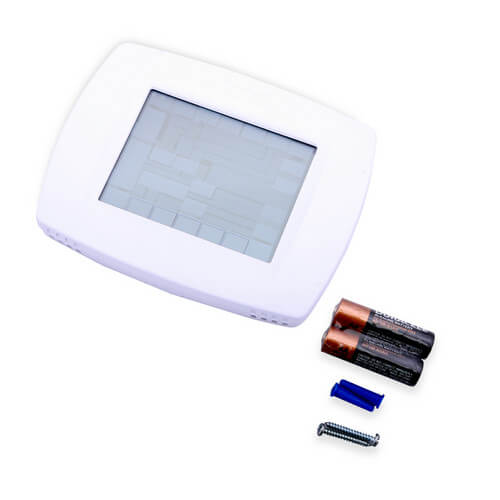
VisionPro Programmable, 1H/1C, Touchscreen Thermostat
 --%3E %3Csvg version='1.1' id='Fill' xmlns='http://www.w3.org/2000/svg' xmlns:xlink='http://www.w3.org/1999/xlink' x='0px' y='0px' viewBox='0 0 100 100' enable-background='new 0 0 100 100' xml:space='preserve'%3E %3Cpath fill='%23F15C02' d='M79.44,0.95H20.56C9.78,0.95,0.95,9.78,0.95,20.56v58.87c0,10.79,8.82,19.61,19.61,19.61h58.87 c10.79,0,19.61-8.83,19.61-19.61V20.56C99.05,9.78,90.22,0.95,79.44,0.95z M65.38,58.24l9.38,29.58L49.69,69.78L24.5,87.82 l9.34-29.6L8.8,39.6l30.73-0.17c0,0,6.98-19.61,10-28.93c0.54,1.36,9.88,29.1,9.88,29.1H91.2L65.38,58.24z'/%3E %3C/svg%3E)
' fill='%23F15C02' d='M49 0C21.938 0 0 21.938 0 49s21.938 49 49 49 49-21.938 49-49S76.062 0 49 0m0 82.709a7.54 7.54 0 1 1 0-15.08 7.54 7.54 0 0 1 0 15.08m7.54-28.412a7.541 7.541 0 0 1-15.08 0V22.831a7.54 7.54 0 0 1 15.08 0v31.466z'/%3E%3C/svg%3E)
MANUALS (5)
 --%3E %3Csvg version='1.1' id='Half' xmlns='http://www.w3.org/2000/svg' xmlns:xlink='http://www.w3.org/1999/xlink' x='0px' y='0px' viewBox='0 0 100 100' enable-background='new 0 0 100 100' xml:space='preserve'%3E %3Cg%3E %3Cpath fill='%23F15C02' d='M30.05,70.23l3.79-12.01L8.8,39.6l30.73-0.17c0,0,6.98-19.61,10-28.93c0.54,1.36,9.88,29.1,9.88,29.1h1.58 L93.71,7.18c-3.58-3.82-8.66-6.23-14.28-6.23H20.56C9.78,0.95,0.95,9.78,0.95,20.56v58.87c0,5.41,2.22,10.32,5.79,13.88 L30.05,70.23z'/%3E %3C/g%3E %3Cpath fill='%23FBC8B4' d='M93.71,7.18L60.98,39.6H91.2L65.38,58.24l9.38,29.58L49.69,69.78L24.5,87.82l5.55-17.59L6.75,93.32 c3.55,3.54,8.44,5.73,13.82,5.73h58.87c10.79,0,19.61-8.83,19.61-19.61V20.56C99.05,15.4,97.01,10.69,93.71,7.18z'/%3E %3C/svg%3E)

Product Highlights


Description
What is the best-selling thermostat we have on our website? What thermostat do we actually use here in our very own office? That would be the Honeywell TH8110U1003. It is the most popular temperature regulator amongst our customers. Based on dozens of customer reviews, it holds an almost perfect score out of 5.0 stars, and it is the most-reviewed product on the whole site. Customers describe it as "easy to program and simple to use" since it is virtually effortless to set and adjust temperatures with this device. This touchscreen, 7-day programmable thermostat has auto changeover, a 5-year warranty, and can include optional indoor and outdoor sensors. If you want your home to feel comfortable for years to come, this VisionPRO thermostat is the best option.
Features
- Energy efficiency can help you save up to 33% annually on heating and cooling costs
- Large, easy-to-read display screen with backlighting of current temperature and time
- Clear menu settings make it possible to set up the device with ease
- Customizable scheduling allows you to program the thermostat based on your personal needs
- Useful HOLD options provide you with the opportunity to override the program schedule for temporary and vacation settings
- Convenient reminders notify you when it?s time to service or replace the air filter, humidifier pad, ultraviolet lamp or thermostat batteries
- Reliable temperature control (+/- 1° F) provides optimal comfort and energy savings
- Automatically updates for daylight savings
- High air quality when programmable fan is combined with whole-house air cleaner
- Keypad lockout capability to protect settings
- Real-time clock keeps correct time during power failures
- 5-year warranty
Specs
| Amperage: | 1 |
|---|---|
| Application: | Single-Stage (Heat/Cool) Heat Pump |
| Stages: | 1 Heat/1 Cool |
| Programmability: | Programmable 7 Day |
| User Interface: | Touchscreen |
| Mount: | Horizontal |
| Options: | Fan Control Works with Sensor Auto Changeover Large Display |
| Power Method: | Battery Hardwired |
| Changeover: | Manual Auto |
| Temperature Range (F): | 40°F - 99°F |
| Max Temp Differential: | 1°F |
| Operating Humidity: | 5 to 90% RH, non-condensing |
| Voltage: | Low voltage 24V 750mV |
| Wattage: | 15 to 25 |
| Wiring: | R, RC, C, W (O/B), Y, G, S1, S2 |
| Frequency: | 50 Hz 60 Hz |
| Color: | Premier White |
| Height: | 4-9/16" |
| Width (Inches): | 6" |
| Depth (Inches): | 1-1/4" |
| Humidity Control: | No |
| Wireless: | No |


Questions?
Compare Similar Products
Heat Pump
7 Day
You May Also Need
Product Reviews
Most Liked Positive Review
great thermostat
Most Liked Negative Review
 --%3E %3Csvg version='1.1' id='With-RB' xmlns='http://www.w3.org/2000/svg' xmlns:xlink='http://www.w3.org/1999/xlink' x='0px' y='0px' viewBox='0 0 100 100' enable-background='new 0 0 100 100' xml:space='preserve'%3E %3Cpath fill='%23FBC8B4' d='M79.44,0.95H20.56C9.78,0.95,0.95,9.78,0.95,20.56v58.87c0,10.79,8.82,19.61,19.61,19.61h58.87 c10.79,0,19.61-8.83,19.61-19.61V20.56C99.05,9.78,90.22,0.95,79.44,0.95z M65.38,58.24l9.38,29.58L49.69,69.78L24.5,87.82 l9.34-29.6L8.8,39.6l30.73-0.17c0,0,6.98-19.61,10-28.93c0.54,1.36,9.88,29.1,9.88,29.1H91.2L65.38,58.24z'/%3E %3C/svg%3E)
Good when it actually works
great thermostat

Excellent Thermostat
I would buy this product again
Well the new one works
Breeze to use!
Great product.
This product was a perfect replacement
Good when it actually works
Thermostat and sensor
Easy install for DIY'ers
Product Q&A
48 QuestionsQ: Will this unit work on gas fired hot water baseboard, with three wire zone valves.
Asked by Ron 14 years ago
Add your answer
Verified Reply- PexSupply StaffYes, it will. You would normally wire each of the three thermostats into a three-zone zone valve controller.
The control should work with any heating system as long as you can mate the control circuits. Download the installation manual and read the wiring options before you buy so you feel confident that it will do what you want.
I don't know the answer. According to https://customer.honeywell.com/resources/techlit/TechLitDocuments/68-0000s/68-0280.pdf It should work. Sent from my iPad
Q: how do i program for cool air ? Does the temperture go higher or lower then the temperture inside the house?
Asked by do not have one 14 years ago
Add your answer
Verified Reply- PexSupply StaffPlease see the following: http://s3.pexsupply.com/manuals/1249544874360/Honeywell_TH8110U1003_Setup&Test_PocketGuide.pdf And also: http://s3.pexsupply.com/manuals/1249544874360/Honeywell_TH8110U1003_Operating_Manual.pdf
Programing set the cool setting to what you want the temp to be, make sure when programming that your are in the cooling mode on the left hand side of the screen.
I am not sure how to answer this one. It is basically just like any other thermostat, you say what temp you want it on and if you want auto fan (runs to required temp and then runs enough to keep it at that temp) or fan on (runs continuously). "Does the temperture go higher or lower then the temperture inside the house?" I am sorry I don't know what this means. If you put it on 68 it will cool the house to 68. If you put it on 80 it will let the house either warm up to 80 (in the summer) and then maintain that temp or heat the house up to 80 in the winter.
The easy way to get instant gratification is to use the arrows to the right of the "Present Setting" temperature on the right. Set the number to the desired temperature. 75 is a reasonably pleasant temperature to have. Of course, first you have to make sure that the thermostat is set for "Cool" on the left. Just tap on the rectangular box at the left, that says "Heat" "Off" or "Cool" until the "Cool" starts blinking. Then tap on "Done" on the tab at the bottom. To program for a more permanent solution, you will need to go through the instructions on the user manual. Sent from my iPad
Q: how long does it take to cool down to set temp? Ours takes 2 hrs to cool down 5 degrees is this normal? Also is it more efficient to run it all day or just when it gets too hot? never had an auto a/c before
Asked by kitty 14 years ago
Add your answer
Verified Reply- PexSupply StaffA thermostat itself is not able to speed up or slow down cooling time. It simply tells the system to go on or off based on room temperature and set point temperature.
The speed of cooling is dependent on the efficiency of the cooling unit, and the insulation. The thermostat will shut off when the desired temperature is reached. Often, the cooling unit might shut off earlier, if it gets overloaded, even though the thermostat wants it to keep going. Another problem that might contribute to the cooling efficiency is if the vents that are controlled by the zoning unit, is malfunctioning. This can lead to cold air escaping to other zones by faulty electronics or mechanics.
The thermostat has nothing to do with the performance of the equipment. If it takes a long time to cool down, it is because the cooling equipment is not sized correctly. the thermostat is simply a sensor that responds to the changes in the controlled environment. Look to the equipment rather than the thermostat. Efficiency is also a function of the equipment operation and not the thermostat. Correctly sized equipment will operate automatically, when necessary. If sized too small it may operate continuously and not cool down the room. If sized too big, it may only operate a few minutes on each cycle before shutting off and waiting for the environment to warm up again. The best sizing will operate approximately 2/3 to 4/5 of the time during average conditions. The extra 20 to 30% is used when conditions are above average. Comfort and energy costs are the determining factor. If you can put up with warmer temperatures longer, you will save money but be less comfortable. If comfort only is the determining factor, set the thermostat for the comfort temperature and let it operate all the time. But, your energy bill will be higher. You will benefit from increased insulation to reduce cooling and heating load as well as allow smaller capacity equipment to be able to do the cooling or heating job at lower energy costs.
There is no absolute yes or no. It depend on many factors within your building and AC/vent system as well the outside temperature. I'm commercial HVAC technician. And, in a church where I do servicing the system, it takes about two hours to cool down five degrees. More efficient way to run the system in early morning(the coolest part of the day) - it uses fresh outdoor air to cool down, not AC - then I do not have to run AC at all during a day. But that is true when nights cold enough(outdoor temperature become cooler than indoor). And that apply to commercial where a building normally occupied during the day, and where vent system(fresh outdoor supply/exhaust indoor blow out) exist. In residential where unfortunately the system functions differently that might be not the case. About efficiency you may try experiment by yourself. But normally, if you are out for hours and then coming home afternoon(evening), it will be more efficient to start your AC upon your arrival(better hour-two in advance if you have programmable thermostat), than to run AC unit all day long. Hope my info helps you a little. Good luck.
Hello, first of all I am no expert on A/C. I am just a guy who purchased this item. That being said, here are my opinions of your questions. I live in AZ so it takes some time to cool down the house. I am also on time of use so I let it get pretty hot during the more expensive time and then cool it down when prices are cheaper. Two hours does seem like a long time but I don't think that sounds out of line. As for efficiency, I would say you have kind of answered that question based on your experience. Either you let it run for a couple of hours to cool it down all at once or you let it keep a relative temp and kind of run as needed. I asked your question to an A/C person last year and they said it makes no difference to the A/C Unit itself (you aren't hurting it by letting it sit for a while and then run hard for a couple of hours). I choose to let it get hot so I am not using energy during peak pricing hours. I hope this answer helps!
Q: Is the Fan on/off programmable based on temperature. In other words can I set the fan to 75 while the AC set at 78 so that the fan runs longer?
Asked by Dan 14 years ago
Add your answer
The easy answer is no. You can program the fan to "Auto" "on" or "Random". In random the fan will still work as in "auto" mode but it also will go on and off randomly to keep circulating all the air in the home. I find "random" helpful because hot air rises and cold air falls. 'Random" helps keep a balance through out the upstairs/downstairs.
I don’t believe the fan off/on is separately programmable as you desire; only “on” and “auto”.
As far as I can tell, no.
Answer of your first part of your quastion:Yes, Only in Auto Mode, I mean: Fan: (Auto - On ) Answer of your Second part of your quastion:You can't set different tempreture for AC and Fan But If you want Fan running with or without AC, you can set Fan to On position no matter temprature. Benny
Hello, to begin with, I am no expert on this product but I have owned and used and fiddled with it for a couple of years now. I actually have found that there are a lot of override codes that are not part of the instructions and you have to call the manufacturer (sometimes more than once to find a knowledgeable rep) to get the codes. That being said, I am not aware that you can set the fan to a different temp than the A/C itself. I hope this helps!
It could be good idea to have such program, although it is not always effective. However, up to your question: Since this type thermostats does not have tho different settings, you need a second thermostat, or have a two-stage VisionPro Programmable, 1H/2C, Touchscreen Thermostat; then a fan connect to first stage, AC to second stage - then you will have some delay in AC/Fan run. Good luck
Q: How accurate is the clock? Do you have to adjust the time often?
Asked by Kamran 14 years ago
Add your answer
The clock on these thermostats is about as accurate as you could hope for a clock to be. I've not readjusted the time on my Vision Pro's in probably 4 years and it's still spot on.
Never. Its spot on.
Pretty darn accurate. Maybe have to change once a year or less.
I have had no problems with this product at all. Installation was easy but took some time to read and understand the instructions. For do it yourselfers, read the directions carefully. The only recommendation that I would make is the self install more clear when it comes to the programming. The directions are not very clear. You need to read it and then find out you are in the wrong area. Tell people you can program controls and allow them to do it from just one set of instructions because you don't get full value it you are not smart enough to know that the professional install has more features. It does not take a professional to install. Just make the instruction both pro and homeowner friendly. O. K. Upchurch III
Q: Can the TH8110U1003 use remote indoor sensor and does one indoor remote sensor take the place of the onboard sensor?
Asked by Krusty 14 years ago
Add your answer
Verified Reply- PexSupply StaffVisionPRO thermostats work with the C7189U1005 indoor sensor. The thermostat's internal sensor no longer functions once the unit is conected to an indoor sensor.
Yes you can use a remote sensor for this unit. It will read the remote sensor and not use the one built into the unit. You do have to tell it you are doing this, (in the set up programming) there are instructions in the book that comes with it. I am a landlord and I put the sensor in the apartments and the main unit in the basement. Good luck.
According to the operating manual, page 28, which covers model TH8110U and others, "if an indoor remote sensor is installed, the display shows the indoor temperature at the location of the sensor (The internal sensor in the thermostat is disabled)." I myself have not used this option on this thermostat, but apparently the answer is yes.
No, the outdoor sensor is in addition to the indoor sensor. There are instructions in the manual for programming the feature. The outdoor temperature shows on the same screen, but in a different location. P
Yes, TH8110U1003 thermostat can use miniature C7189U1005 remote indoor sensor, and this sensor (I have experienced with it) pretty accurate; may be installed anywhere in a building withing 200 feet of the thermostat. Use the Thermostat's Installer Setup chart, function code 0340(Remote sensor) to set to 3(Indoor sensor); if the actual temperature is different from the temperature shown on thermostat's display - use code 0700(Temperature display offset) to set to the number(from -3 to 3) that best matches actual temperature. Good luck.
Hello, Yes the TH8000 series thermostats (including the TH8110U1003) can use remote sensor C7189U. You have to run wires between the sensor and the thermostat. At the thermostat wires go to S1 and S2 terminals. This disables the thermostat's internal (onboard) sensor. Hope this helps, BD
Yes the TH8110U1003 can be use by with a remote indoor sensor by change thermostat program setting Superstar Heating & Burner Corp. Vito Grillo The Boiler Man
Yes you can use the remote indoor sensor and it will replace the built in sensor.
I believe the thermostat can accept a remote sensor. It also can accept an outdoor sensor. The indoor remote would take the place of on board sensor. Outdoor sensor will show outside temp on thermostat. Eric EZ Does IT!
Q: I have two gas furnaces and two heat pumps. Do I need 2 stage thermostats or single.
Asked by 15 years ago
Add your answer
Verified Reply- PexSupply StaffIt depends on the furnaces and heat pumps in question. The stages on the thermostats must match those on the furnaces/heat pumps.
Q: I have a termostate with a remote control, how do i password it so that the heat is kept constant.
Asked by Salma 15 years ago
Add your answer
Verified Reply- PexSupply StaffThis particular thermostat does not have a password lockout function. The only way to lock its screen is through the installer setup functions. It can be used with a C7189U1005 indoor sensor, which would allow you to control the temperature remotely.
Q: I have a one pipe steam heat system , will this thermostat work for me? How does the remote sensor work with the thermostat, does it average the temp?
Asked by 15 years ago
Add your answer
Verified Reply- PexSupply StaffThis thermostat will work with a one-pipe steam system. The use of any sensor will override the thermostat's sensor.
Q: Will this unit work with an oil fired baseboard system that uses zone valves?
Asked by Tom 15 years ago
Add your answer
Verified Reply- PexSupply StaffYes, but it would only be able to operate one of the zones.
The Vision Pro Programmable by Honeywell is their number one selling thermostat. It has got a great interface which allows for easy programming and simple operation, not to mention the fact that it'll decrease energy costs up to 33%. This product would work perfectly with your oil fired baseboard system as it is also a two-wire system wotj power to open and close zone valves.