


'/%3E%3C/svg%3E)
VisionPro Programmable, 1H/1C, Touchscreen Thermostat
 --%3E %3Csvg version='1.1' id='Fill' xmlns='http://www.w3.org/2000/svg' xmlns:xlink='http://www.w3.org/1999/xlink' x='0px' y='0px' viewBox='0 0 100 100' enable-background='new 0 0 100 100' xml:space='preserve'%3E %3Cpath fill='%23F15C02' d='M79.44,0.95H20.56C9.78,0.95,0.95,9.78,0.95,20.56v58.87c0,10.79,8.82,19.61,19.61,19.61h58.87 c10.79,0,19.61-8.83,19.61-19.61V20.56C99.05,9.78,90.22,0.95,79.44,0.95z M65.38,58.24l9.38,29.58L49.69,69.78L24.5,87.82 l9.34-29.6L8.8,39.6l30.73-0.17c0,0,6.98-19.61,10-28.93c0.54,1.36,9.88,29.1,9.88,29.1H91.2L65.38,58.24z'/%3E %3C/svg%3E)
' fill='%23F15C02' d='M49 0C21.938 0 0 21.938 0 49s21.938 49 49 49 49-21.938 49-49S76.062 0 49 0m0 82.709a7.54 7.54 0 1 1 0-15.08 7.54 7.54 0 0 1 0 15.08m7.54-28.412a7.541 7.541 0 0 1-15.08 0V22.831a7.54 7.54 0 0 1 15.08 0v31.466z'/%3E%3C/svg%3E)
MANUALS (5)
 --%3E %3Csvg version='1.1' id='Half' xmlns='http://www.w3.org/2000/svg' xmlns:xlink='http://www.w3.org/1999/xlink' x='0px' y='0px' viewBox='0 0 100 100' enable-background='new 0 0 100 100' xml:space='preserve'%3E %3Cg%3E %3Cpath fill='%23F15C02' d='M30.05,70.23l3.79-12.01L8.8,39.6l30.73-0.17c0,0,6.98-19.61,10-28.93c0.54,1.36,9.88,29.1,9.88,29.1h1.58 L93.71,7.18c-3.58-3.82-8.66-6.23-14.28-6.23H20.56C9.78,0.95,0.95,9.78,0.95,20.56v58.87c0,5.41,2.22,10.32,5.79,13.88 L30.05,70.23z'/%3E %3C/g%3E %3Cpath fill='%23FBC8B4' d='M93.71,7.18L60.98,39.6H91.2L65.38,58.24l9.38,29.58L49.69,69.78L24.5,87.82l5.55-17.59L6.75,93.32 c3.55,3.54,8.44,5.73,13.82,5.73h58.87c10.79,0,19.61-8.83,19.61-19.61V20.56C99.05,15.4,97.01,10.69,93.71,7.18z'/%3E %3C/svg%3E)

Product Highlights


Description
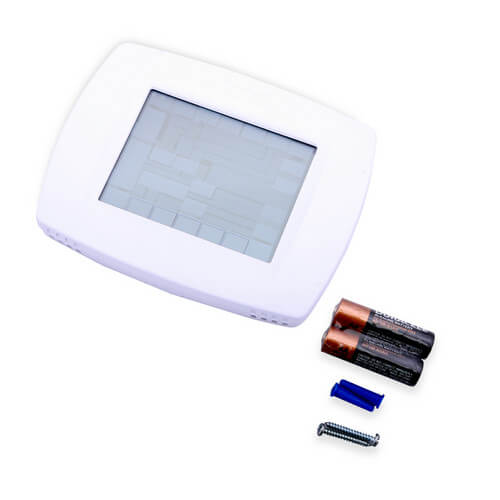
What is the best-selling thermostat we have on our website? What thermostat do we actually use here in our very own office? That would be the Honeywell TH8110U1003. It is the most popular temperature regulator amongst our customers. Based on dozens of customer reviews, it holds an almost perfect score out of 5.0 stars, and it is the most-reviewed product on the whole site. Customers describe it as "easy to program and simple to use" since it is virtually effortless to set and adjust temperatures with this device. This touchscreen, 7-day programmable thermostat has auto changeover, a 5-year warranty, and can include optional indoor and outdoor sensors. If you want your home to feel comfortable for years to come, this VisionPRO thermostat is the best option.
Features
- Energy efficiency can help you save up to 33% annually on heating and cooling costs
- Large, easy-to-read display screen with backlighting of current temperature and time
- Clear menu settings make it possible to set up the device with ease
- Customizable scheduling allows you to program the thermostat based on your personal needs
- Useful HOLD options provide you with the opportunity to override the program schedule for temporary and vacation settings
- Convenient reminders notify you when it?s time to service or replace the air filter, humidifier pad, ultraviolet lamp or thermostat batteries
- Reliable temperature control (+/- 1° F) provides optimal comfort and energy savings
- Automatically updates for daylight savings
- High air quality when programmable fan is combined with whole-house air cleaner
- Keypad lockout capability to protect settings
- Real-time clock keeps correct time during power failures
- 5-year warranty
Specs
| Amperage: | 1 |
|---|---|
| Application: | Single-Stage (Heat/Cool) Heat Pump |
| Stages: | 1 Heat/1 Cool |
| Programmability: | Programmable 7 Day |
| User Interface: | Touchscreen |
| Mount: | Horizontal |
| Options: | Works with Sensor Auto Changeover Large Display Fan Control |
| Power Method: | Hardwired Battery |
| Changeover: | Manual Auto |
| Temperature Range (F): | 40°F - 99°F |
| Max Temp Differential: | 1°F |
| Operating Humidity: | 5 to 90% RH, non-condensing |
| Voltage: | Low voltage 24V 750mV |
| Wattage: | 15 to 25 |
| Wiring: | R, RC, C, W (O/B), Y, G, S1, S2 |
| Frequency: | 50 Hz 60 Hz |
| Color: | Premier White |
| Height: | 4-9/16" |
| Width (Inches): | 6" |
| Depth (Inches): | 1-1/4" |
| Wireless: | No |
| Humidity Control: | No |


Questions?
Compare Similar Products
Heat Pump
7 Day
You May Also Need
Product Reviews
Most Liked Positive Review
great thermostat
Most Liked Negative Review
 --%3E %3Csvg version='1.1' id='With-RB' xmlns='http://www.w3.org/2000/svg' xmlns:xlink='http://www.w3.org/1999/xlink' x='0px' y='0px' viewBox='0 0 100 100' enable-background='new 0 0 100 100' xml:space='preserve'%3E %3Cpath fill='%23FBC8B4' d='M79.44,0.95H20.56C9.78,0.95,0.95,9.78,0.95,20.56v58.87c0,10.79,8.82,19.61,19.61,19.61h58.87 c10.79,0,19.61-8.83,19.61-19.61V20.56C99.05,9.78,90.22,0.95,79.44,0.95z M65.38,58.24l9.38,29.58L49.69,69.78L24.5,87.82 l9.34-29.6L8.8,39.6l30.73-0.17c0,0,6.98-19.61,10-28.93c0.54,1.36,9.88,29.1,9.88,29.1H91.2L65.38,58.24z'/%3E %3C/svg%3E)
Good when it actually works
great thermostat

Excellent Thermostat
I would buy this product again
Well the new one works
Breeze to use!
Great product.
This product was a perfect replacement
Good when it actually works
Thermostat and sensor
Easy install for DIY'ers
Product Q&A
48 QuestionsQ: While attempting to change the batteries, I dropped the front part of TH8110U. It works some of the time, so I am sure I damaged the unit. Will a new front section work if it is placed on the wall portion which still works perfectly? Is it possible to purchase just that damaged section?
Asked by Woodtx 11 years ago
Add your answer
Verified Reply- Supplyhouse StaffNo it is not guaranteed to fit or work on an older base, no they do not make replacement parts for thermostats
Q: My Honeywell Thermostat Th8320U1008 has a code EE
Asked by freezing 11 years ago
Add your answer
Verified Reply- Supplyhouse Staffyou would need to call Honeywell to trouble shoot
Q: How do I unlock the screen when fully locked?!!
Asked by Quite Frustrated 12 years ago
Add your answer
Get the stat into programming mode, and advance to code 0670. This is the keypad lock code. If its value is 1 or 2, drop the value to 0. Then press done. The keypad / screen will be unlocked.
Q: Someone other than myself installed this while my wife and I were away for several months. Everything works well except for one issue I haven't been able to fix. Even though I have the fan set on "Auto" it keeps on running, 24 hrs. a day every day, even when I program it to stop! This is getting costly not to mention that the HVAC is now almost 15 years old and I'm concerned the fan motor will fail sooner than expected.
Asked by Sailing40 12 years ago
Add your answer
Its wired up wrong.
sounds like the relay switch on the handler/blower isn't working properly.
It's doesn't sound Like the stat is the issue. Most Lilly they wired it up wrong. The green and red must be tied together somewhere. Sent from my iPhone
I learned through trial and error that ‘auto’ for the fan means that the fan is following whatever is programmed. If you’re using the 2 event or 4 event schedulers, check the fan’s programmed status in each schedule segment. A test for this is to put the stat in ‘hold’ mode, and cycle the fan through its settings. If it’s status changes, it’s a programming issue. If it doesn’t, there is also a chance the stat was wired incorrectly. Don Ross Madison, WI
A defect is always possible but, much more likely there is either a wire crossed or bridged at the connections in the thermostat or at the HVAC unit. Damaged wires, such as from a screw or nail, creating a connection (short) where there shouldn't be one. Depending on if its the heat or AC mode that won't shut off, check those terminals carefully and if they're all clean, no tail touching another screw, try reversing those two wires for the heat/AC. And just in case you don't know, this T-stat has a 'circ" for circulate mode that will run just the fan for X minutes/hr. Be sure that isn't turned on at the touch screen. Good luck. Paul
Check the wiring. It sounds like the fan connection is tied to the power lead. Go look at the wiring at the furnace and compare that wiring to that at the thermostat. I'm sure there is a wiring error. Look at the wiring instruction, it includes the standard color codes for each lead . . . that may help you sort it out.
Q: Does this thermostat have wifi capacity? Is there a battery back up?
Asked by LK 12 years ago
Add your answer
The stat does not have wi-fi. Three AAA’s are the battery backup.
This one does not have WiFi. There is a backup battery that saves the setting etc.
There is a battery backup. There is no WiFi connectivity.
This thermostat does not have wifi capacity. (At least my Vision PRO 8000, 1 Heat / 1 Cool doesn't have it.) It has three AAA batteries that can power it for more than a year; it also has a single button wafer cell back-up to these AAA batteries, which keeps the thermostat energized when the AAA batteries are changed. It also runs off the 24V AC supply from the cooling system. There is a jumper connecting the RC and R pins on the plate that mounts on the wall; This jumper must be in place if yo u do not have air conditioning in order to power the thermostat from the 24 AC supply from the heating unit.
Q: Can this or any thermostat use two separate sensors for heating. I have a 1st floor apartment and a basement apartment on two separate pumps.
Asked by chris 13 years ago
Add your answer
This is a single zone thermostat. You will need two thermostats, one for each heat pump. The remote temperature sensor only provides information; it doesn't control the heat/cool device.
Q: Can this or any thermostat use two separate sensors for heating. I have a 1st floor apartment and a basement apartment on two separate pumps.
Asked by chris 13 years ago
Add your answer
No. This 8000 series Honey well thermostat can not be controlled by two sensors; it has only one temperature measurement circui t controlling a heater switch and a cooler switch . It does have a place to connect a remote sensor. You can program the thermostat to use the remote sensor to control the heater/cooler switches instead of the internal temperature sensor. The remote sensor would usually be used to show the outside temperature on the thermostat display. I suggest that you just use two separate thermostats. You need to put separate sensors in each of your two locations anyway; they might as well be thermostats. Whole building heating/cooling/ventilation control systems are available which coordinate all the heating/cooling/ventilation operations in a building. They are more complicated to set-up and are controlled from a central location. They are more complicated than yo u need with no advantage. This 8000 series Honeywell thermostat has a 15 minute time constant, meaning it takes about 15 minutes to respond to a temperature change. If your heating system can heat the room/house is less than 15 minutes, the temperature will overshoot, resulting in a temperature oscillation. I bought a bare glass enclosed Honeywell sensor (with a fast response) from Mouser, and connect it to the remote sensor terminal block. Then I programmed the thermostat to use the remote sensor for controlling the heating . I sh ould have bought a different model thermostat that wasn't so slow to respond to changes in temperature. The Honeywell help line does not think the 15 minute response time is a problem. Dick Koehler
I have dual temperature control system. It should work as far as I know I hope this helps Sent from my iPhone
You can use multiple sensors with the Vison Pro, but you need to use square numbers of thermostats due to Ohm's law. The manual describes this idea, but you would need to use four sensors (two in each apartment) for the application you describe. This thermostat's on-board sensor is disabled when it is used with remote indoor sensors and it creates an average among any area that have sensors.
Q: Can this be used for central air for cooling only
Asked by will 13 years ago
Add your answer
Verified Reply- PexSupply StaffEven though this is a heat/cool thermostat, it can be used for cooling only (or heating only).
Yes, it can. Sent from my iPad
The installation instructions for the thermostat also lists a wiring guide for a cool only system. So the answer to your question would be yes.
Absolutely
Sure, why not . . . a thermostat can control any system with compatible control voltage.
Yes.
Q: HOW MANY TIMES CAN YOU SET THE PROGRAMS TO CHANGE TEMP IN ONE DAY? IS IT 4 TIMES?
Asked by BG 13 years ago
Add your answer
4 times Sent from my iPad
Yes. Up to four changes a day Sent from my iPhone
Yes, 4 times total per day.
Yes that is correct. You can program four (4) time periods each day with different settings for weekdays and weekends. _______________________________
You can change the number of times in the setup program. Four is the maximum setting.
Q: Will the RedLINK C7089R1013 wireless Outdoor Air Sensor work with this thermostat? If not, can you make a reccomendation? Thank you!
Asked by Chip 13 years ago
Add your answer
Verified Reply- PexSupply StaffNo, this thermostat is not compatible with RedLINK devices.
No the VisionPro touchscreen thermostat is not a wireless device. You will have to go to a wireless red-link thermostat to use that outdoor sensor. You can us a wired outdoor sensor with the VisonPro line though. If you can't pull a 2 conductor wire out from the thermostat out to the sensor, you can step up to any of the Red-Linked capable Honeywell stats.
I doubt a wireless sensor would work. The temp sensor is uses a current loop, with the changing temperature changing the resistance and thus the current. A wireless sensor most likely transmits a digital signal. Interfacing the two would be a challenge. TM (Electronics Engineer)