



'/%3E%3C/svg%3E)
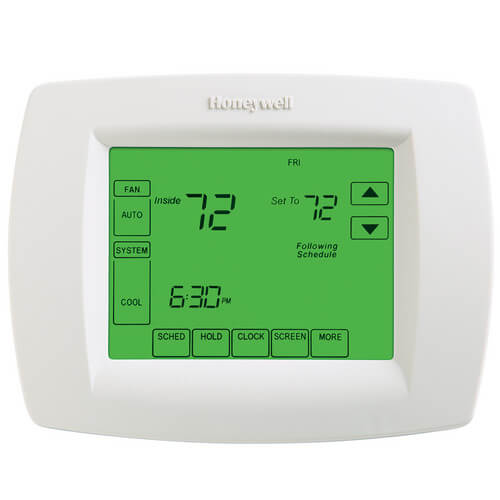
VisionPro Programmable, 3H/2C, Touchscreen Thermostat & Dehumid Control
 --%3E %3Csvg version='1.1' id='Fill' xmlns='http://www.w3.org/2000/svg' xmlns:xlink='http://www.w3.org/1999/xlink' x='0px' y='0px' viewBox='0 0 100 100' enable-background='new 0 0 100 100' xml:space='preserve'%3E %3Cpath fill='%23F15C02' d='M79.44,0.95H20.56C9.78,0.95,0.95,9.78,0.95,20.56v58.87c0,10.79,8.82,19.61,19.61,19.61h58.87 c10.79,0,19.61-8.83,19.61-19.61V20.56C99.05,9.78,90.22,0.95,79.44,0.95z M65.38,58.24l9.38,29.58L49.69,69.78L24.5,87.82 l9.34-29.6L8.8,39.6l30.73-0.17c0,0,6.98-19.61,10-28.93c0.54,1.36,9.88,29.1,9.88,29.1H91.2L65.38,58.24z'/%3E %3C/svg%3E)
' fill='%23F15C02' d='M49 0C21.938 0 0 21.938 0 49s21.938 49 49 49 49-21.938 49-49S76.062 0 49 0m0 82.709a7.54 7.54 0 1 1 0-15.08 7.54 7.54 0 0 1 0 15.08m7.54-28.412a7.541 7.541 0 0 1-15.08 0V22.831a7.54 7.54 0 0 1 15.08 0v31.466z'/%3E%3C/svg%3E)
MANUALS (5)
 --%3E %3Csvg version='1.1' id='Half' xmlns='http://www.w3.org/2000/svg' xmlns:xlink='http://www.w3.org/1999/xlink' x='0px' y='0px' viewBox='0 0 100 100' enable-background='new 0 0 100 100' xml:space='preserve'%3E %3Cg%3E %3Cpath fill='%23F15C02' d='M30.05,70.23l3.79-12.01L8.8,39.6l30.73-0.17c0,0,6.98-19.61,10-28.93c0.54,1.36,9.88,29.1,9.88,29.1h1.58 L93.71,7.18c-3.58-3.82-8.66-6.23-14.28-6.23H20.56C9.78,0.95,0.95,9.78,0.95,20.56v58.87c0,5.41,2.22,10.32,5.79,13.88 L30.05,70.23z'/%3E %3C/g%3E %3Cpath fill='%23FBC8B4' d='M93.71,7.18L60.98,39.6H91.2L65.38,58.24l9.38,29.58L49.69,69.78L24.5,87.82l5.55-17.59L6.75,93.32 c3.55,3.54,8.44,5.73,13.82,5.73h58.87c10.79,0,19.61-8.83,19.61-19.61V20.56C99.05,15.4,97.01,10.69,93.71,7.18z'/%3E %3C/svg%3E)

Product Highlights


Description
Features
- Large, Clear Display with Backlighting current temperature, set temperature and time are easy-to-read and all are displayed on the home screen.
- Menu Driven Programming Guides you through the scheduling process, showing only necessary information and choices on each screen.
- Ability to Select Multiple Days allows you to easily customize the thermostat for your unique schedule.
- Real-Time Clock keeps time during power failure. automatically updates for daylight savings.
- Armchair Programming allows you to remove thermostat from wall to set the schedule.
- Precise Temperature Control (+/- 1°F) reliable, consistent comfort.
- Multiple HOLD options allow you to modify schedule indefinitely or for a specific time.
- Change Reminders reminds you to service or replace the air filter, humidifier pad, ultraviolet lamp or thermostat batteries.
- Programmable Fan increases air quality when combined with a whole-house air cleaner.
- Outdoor Temperature Indication (Select Models) shows current outdoor temperature on the display to help you plan outdoor activities.
Specs
| Amperage: | 1 |
|---|---|
| Application: | Multi-Stage (Heat/Cool) Heat Pump |
| Stages: | 3 Heat/2 Cool Heat Pump |
| Programmability: | Programmable 7 Day |
| User Interface: | Touchscreen |
| Mount: | Horizontal |
| Options: | Works with Sensor Fan Control Password Lockout Auto Changeover Large Display |
| Power Method: | Hardwired Battery |
| Changeover: | Manual Auto |
| Temperature Range (F): | 40°F - 99°F |
| Voltage: | Low voltage 24V 750mV |
| Wattage: | 15 to 25 |
| Wiring: | L C S1 S2 |
| Color: | Premier White |
| Height: | 4-9/16" |
| Width (Inches): | 6" |
| Depth (Inches): | 1-1/4" |
| Humidity Control: | No |
| Wireless: | No |


Questions?
Compare Similar Products
Heat Pump
7 Day
Fan Control
Password Lockout
Auto Changeover
Large Display
You May Also Need
Product Reviews
best thermostat

Smarter than me
Honeywell VisionPro Thermostat
Honeywell Controls Rule
I would buy this product again and again
 --%3E %3Csvg version='1.1' id='With-RB' xmlns='http://www.w3.org/2000/svg' xmlns:xlink='http://www.w3.org/1999/xlink' x='0px' y='0px' viewBox='0 0 100 100' enable-background='new 0 0 100 100' xml:space='preserve'%3E %3Cpath fill='%23FBC8B4' d='M79.44,0.95H20.56C9.78,0.95,0.95,9.78,0.95,20.56v58.87c0,10.79,8.82,19.61,19.61,19.61h58.87 c10.79,0,19.61-8.83,19.61-19.61V20.56C99.05,9.78,90.22,0.95,79.44,0.95z M65.38,58.24l9.38,29.58L49.69,69.78L24.5,87.82 l9.34-29.6L8.8,39.6l30.73-0.17c0,0,6.98-19.61,10-28.93c0.54,1.36,9.88,29.1,9.88,29.1H91.2L65.38,58.24z'/%3E %3C/svg%3E)
Great Thermostat
Humidity Control Is Great
Excellent product - easy install
Very pleased
Awesome Thermostat
Product Q&A
8 QuestionsQ: with this thermostat function as follows: owner sets temp (ie. 76deg.) and can then put in a code on keypad, which prevents anyone else from changing the temp, except the owner who set it, with the code.???? thanks Ken
Asked by ken 12 years ago
Add your answer
Verified Reply- SupplyHouse StaffThis thermostat only provides the ability to lock the screen by changing a setting in the Installer Setup Menu. The setting can be changed fairly easily by anyone who accesses a manual for the thermostat. You may want to consider a Robertshaw 9725I2 thermostat if you desire pass-code lockout. Thermostats in Robertshaw's i2 Series have a similar installer setting, but they also allow installers to enter a four-digit pin to secure access to the settings menu.
No, it doesn’t lock.
Q: I have programed this unit, one of four, but this unit thinks it's Friday instead of Wednesday. How do I get the unit on the right day? Honeywell Vision PRO 8000 touchscreen, TH8321U1006 Thank You!!!
Asked by ken 12 years ago
Add your answer
Verified Reply- SupplyHouse StaffFor detailed instructions please see the section "clock settings" on page 6 of the user manual located here: http://s3.supplyhouse.com/manuals/1249544874360/Honeywell_TH8321U1006_Operating_Manual.pdf
Q: What should I set the temperature to in Fl. in the summer when I will be gone for several months with this thermostat that has dehumidity control?
Asked by Handyman 12 years ago
Add your answer
Hi, Bought one of these for exactly the same reason..maintain the humidity while we were away. However, the problem is that there is no feedback on equipment operation. We experienced an equipment failure so were unaware that the inside temperature was in the 90's when we returned. We have since replaced all our thermostats with WiFi connected units which allows us to monitor the temperature, humidity and operation of the A/C units remotely..that is the feature we really like. Harry Stribos
Personally, for hot months I would set it to 78 degrees but then (and I think just as important) I would also run a dehumidifier which can continuously drain into your sink.
This unit can be set to control the level of humidity in the home separate of the temp. It will decrease summer humidity. It will run the the air conditioner up to 3 degrees below the set point to reduce humidity. As far as what to set it for depends on the area and materials your home is made out of. The attached article should help you decide. http://www.fsec.ucf.edu/en/publications/pdf/fsec-pf-438-09.pdf Sent from my iPad
Q: I currently have a Vision Pro Commercial TB8220U1003. If I change to the Vision Pro TH8321U1006 can I use the Vision Pro Commercial TB8220U1003 Wall plate? it looks like the wire connections are the same.
Asked by 14 years ago
Add your answer
Verified Reply- PexSupply StaffHoneywell recommends the same cover plate for both those units (part 32003796-001). You should have no problem using the one from the existing TB8220U1003 unit with the new TH8321U1006 thermostat.
Q: I have a TH8320 thermostat with a broken screen that I need to replace. This model is intriguing because of the humidity control. Can this model be used in place of the TH8320 and if so, can it be installed on the same coverplate?
Asked by Don 15 years ago
Add your answer
Verified Reply- PexSupply StaffYou can use this unit to replace the the TH8320. It should fit on the same cover plate.
Yes, this unit is essentially a TH8320 with the humidity control added. The size, features and electrial hook up will be the same but you will now have humidity control -- and it will fit on the same coverplate.
Q: How do I turn off the screen light completely. I need complete darkness in the bedroom at night? My heating man said this can be done. Thanks
Asked by Eric 16 years ago
Add your answer
Verified Reply- PexSupply StaffSet to "O" to turn the backlight OFF. Use function #0280 if you would like to change the setting.
Touch the SYSTEM area then press and hold the middle square at the bottom to get to the advanced functions setup. Scroll through the function numbers to Function 280 and change the setting to 0. The backlight will stay on for 8 seconds after you touch the screen than cut off.
Q: This thermostat refers to a "Dehumid" control...Our heating and cooling system has a humidifier control feature to bring moisture into the air on dry windy days...What does a "Dehumid" control mean? We need a thermostat that allows us to add moisture to our home due to asthma. If this is not the right model for us...can you recommend the correct model. Thanks
Asked by Bill 16 years ago
Add your answer
Verified Reply- PexSupply StaffAccording to the manufacturer, the Dehumidification control: TH8321 models monitor the indoor humidity level and automatically activate the cooling system to reduce humidity by lowering the temperature by up to 3 degrees below the current cool setting. Please refer to the Installation Manual for more information: http://s3.pexsupply.com/manuals/1249544874360/Honeywell_TH8321U1006_Install_Guide.pdf
Dehumidification control is where the thermostat utilizes your heating and cooling equipment to remove moisture from the air. I do not believe that this thermostate would be the proper model for humidifying...adding moisture to the air. I am sure Honeywell makes a thermostat for your purpose but I do not know the model.
Q: how do I wire for a oil heat and 2 stages air?
Asked by Tiny 16 years ago
Add your answer
Verified Reply- PexSupply StaffThe wiring diagram can be seen on page three of the installation instructions. The link to the document has been provided below. http://s3.pexsupply.com/manuals/1249544874360/Honeywell_TH8321U1006_Install_Guide.pdf