





'/%3E%3C/svg%3E)
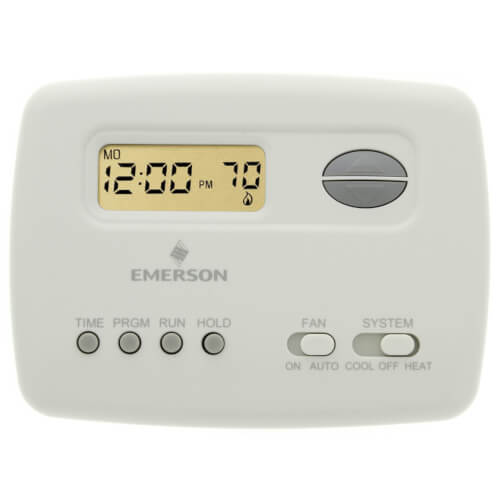
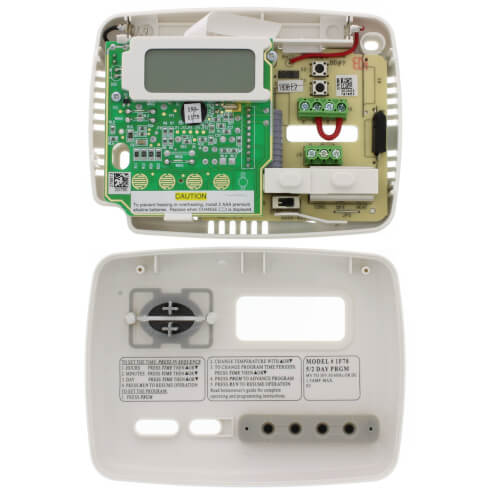
70 Series Programmable, 1H/1C, Digital Thermostat
 --%3E %3Csvg version='1.1' id='Fill' xmlns='http://www.w3.org/2000/svg' xmlns:xlink='http://www.w3.org/1999/xlink' x='0px' y='0px' viewBox='0 0 100 100' enable-background='new 0 0 100 100' xml:space='preserve'%3E %3Cpath fill='%23F15C02' d='M79.44,0.95H20.56C9.78,0.95,0.95,9.78,0.95,20.56v58.87c0,10.79,8.82,19.61,19.61,19.61h58.87 c10.79,0,19.61-8.83,19.61-19.61V20.56C99.05,9.78,90.22,0.95,79.44,0.95z M65.38,58.24l9.38,29.58L49.69,69.78L24.5,87.82 l9.34-29.6L8.8,39.6l30.73-0.17c0,0,6.98-19.61,10-28.93c0.54,1.36,9.88,29.1,9.88,29.1H91.2L65.38,58.24z'/%3E %3C/svg%3E)
 --%3E %3Csvg version='1.1' id='Half' xmlns='http://www.w3.org/2000/svg' xmlns:xlink='http://www.w3.org/1999/xlink' x='0px' y='0px' viewBox='0 0 100 100' enable-background='new 0 0 100 100' xml:space='preserve'%3E %3Cg%3E %3Cpath fill='%23F15C02' d='M30.05,70.23l3.79-12.01L8.8,39.6l30.73-0.17c0,0,6.98-19.61,10-28.93c0.54,1.36,9.88,29.1,9.88,29.1h1.58 L93.71,7.18c-3.58-3.82-8.66-6.23-14.28-6.23H20.56C9.78,0.95,0.95,9.78,0.95,20.56v58.87c0,5.41,2.22,10.32,5.79,13.88 L30.05,70.23z'/%3E %3C/g%3E %3Cpath fill='%23FBC8B4' d='M93.71,7.18L60.98,39.6H91.2L65.38,58.24l9.38,29.58L49.69,69.78L24.5,87.82l5.55-17.59L6.75,93.32 c3.55,3.54,8.44,5.73,13.82,5.73h58.87c10.79,0,19.61-8.83,19.61-19.61V20.56C99.05,15.4,97.01,10.69,93.71,7.18z'/%3E %3C/svg%3E)


MANUALS (3)
Product Highlights


Description
1F78-151
5+2 Day Programmable Thermostat, 24 Volt or Millivolt system, Horizontal
FEATURES
- Battery powered for maximum compatibility.
- Fossil fuel or electric heat compatible.
- Large LCD with backlight.
- Selectable Celsius or Fahrenheit temperature display.
- Includes O and B terminals.
- Classic White color.
Specs
| Amperage: | 1.5 |
|---|---|
| Application: | Single-Stage (Heat/Cool) |
| Stages: | 1 Heat/1 Cool |
| Programmability: | 5-2 Day Programmable |
| User Interface: | Push Button |
| Mount: | Horizontal |
| Options: | Fan Control |
| Power Method: | Battery |
| Changeover: | Manual |
| Temperature Range (F): | 45°F - 90°F |
| Voltage: | Low voltage 24V |
| Wattage: | 1.5 to 45 |
| Wiring: | Rc W Y G B Rh O |
| Color: | White |
| Height: | 3-3/4" |
| Width: | 5-1/8" |
| Depth (Inches): | 1-1/8" |


Questions?
Compare Similar Products

Programmable
You May Also Need
Product Reviews
Most Liked Positive Review
White Rogers thermostat 1f78-151 no backlight.
Most Liked Negative Review
 --%3E %3Csvg version='1.1' id='With-RB' xmlns='http://www.w3.org/2000/svg' xmlns:xlink='http://www.w3.org/1999/xlink' x='0px' y='0px' viewBox='0 0 100 100' enable-background='new 0 0 100 100' xml:space='preserve'%3E %3Cpath fill='%23FBC8B4' d='M79.44,0.95H20.56C9.78,0.95,0.95,9.78,0.95,20.56v58.87c0,10.79,8.82,19.61,19.61,19.61h58.87 c10.79,0,19.61-8.83,19.61-19.61V20.56C99.05,9.78,90.22,0.95,79.44,0.95z M65.38,58.24l9.38,29.58L49.69,69.78L24.5,87.82 l9.34-29.6L8.8,39.6l30.73-0.17c0,0,6.98-19.61,10-28.93c0.54,1.36,9.88,29.1,9.88,29.1H91.2L65.38,58.24z'/%3E %3C/svg%3E)
Worst thermostat for wiring space
Worst thermostat for wiring space
I use these at all my rentals and my own home.
Replaced with exact same
User Friendly
Very Satisfied
Used in the basement and garage.
Exactly what was needed
feels cheap -- no back light
Perfect part
Great buy and service
Product Q&A
42 QuestionsQ: I am seeing a "star" symbol on the screen
Asked by Mary 14 years ago
Add your answer
Verified Reply- PexSupply StaffAccording to the manual, if the temperature is adjusted to call for cool within 5 minutes of the last cycle the snowflake (star) icon will blink indicating the thermostat is locked out. After 3 to 5 minutes, the compressor will start and the snowflake (star) icon will stop flashing. This helps prevent the compressor from cycling too quickly and is normal operation for the thermostat. See the link below for more information: http://s3.pexsupply.com/manuals/1249544570102/White_Rodgers_1F78-151_Instructions.pdf
You're in cooling mode! If it's flashing your compressor is on lockout. It should clear in 10-20 min...
Q: How do I turn on the backlight for the LCD screen?
Asked by 15 years ago
Add your answer
Verified Reply- PexSupply StaffYou can configure the backlight to turn on after any button is pressed. To do this, press the "Time" and "Run" buttons simultaneously, and use the arrows to change the "off" that appears on the screen to "on."
Q: Will my white rodgers work in Celsius
Asked by 15 years ago
Add your answer
Verified Reply- PexSupply StaffThis thermostat can be operated in Celsius by clipping the W904 jumper on the circuit board. Please refer to the Installation Guide linked below for more information. http://s3.pexsupply.com/manuals/1249544570102/White_Rodgers_1F78-151_Instructions.pdf
Yes. Clipping a wire on the circuit board with alter to Celsius.
Q: i do not know how to work this thermostat. i don`t know how to set it, and work it at all please help me set this. thank you
Asked by lisa 15 years ago
Add your answer
Verified Reply- PexSupply StaffPlease refer to the Installation Instructions linked below: http://s3.pexsupply.com/manuals/1249544570102/White_Rodgers_1F78-151_Instructions.pdf
Q: How do I set thermostat to run manuall though I still have programs set?
Asked by 15 years ago
Add your answer
Verified Reply- PexSupply StaffYou can use the Temperature Override and Hold Temperature settings discussed on page 4 of the Installation Manual linked below: http://s3.pexsupply.com/manuals/1249544570102/White_Rodgers_1F78-151_Instructions.pdf
Q: how do i erase all programs so as i can operate thermostat manually
Asked by 15 years ago
Add your answer
Verified Reply- PexSupply StaffThe programs cannot be erased, but you can use the 'Hold' function discussed on page 4 of the following manual: http://s3.pexsupply.com/manuals/1249544570102/White_Rodgers_1F78-151_Instructions.pdf
Q: My thermostat is frozen in "Hold" mode, the "flame"emblem is displayed. I am unable to change the mode to "run" or adjust the temp.
Asked by Mike 15 years ago
Add your answer
Verified Reply- PexSupply StaffIf a voltage spike or static discharge blanks out the display or causes erratic thermostat operation you can reset the thermostat by pressing , Up arrow, Down Arrow, and TIME at the same time. This also resets the factory defaults.
Q: I changed batteries and now lost the ability to program 4 different times on the weekday.There are only 3 times available to me. How do I fix this or revert back to factory to re-adjust?
Asked by 15 years ago
Add your answer
Verified Reply- PexSupply StaffWe are not sure why changing the batteries would have this effect on the thermostat. Please refer to the instructions below for information on resetting the thermostat. http://s3.pexsupply.com/manuals/1249544570102/White_Rodgers_1F78-151_Instructions.pdf
Q: how do you remove cover/
Asked by 15 years ago
Add your answer
Verified Reply- PexSupply StaffYou need to pull the cover gently straight off the base. Forcing or prying on the thermostat will cause damage to the unit.
Just put you fingers in the lower front half of the thermostat and pop the cover off.
Q: How do I program to have it turn on in the morning at a designated temperature and then turn off at a certain time?
Asked by 15 years ago
Add your answer
Verified Reply- PexSupply StaffThis thermostat can be set up for 4 program periods during the day. Please refer to the following manual for more details on how to set them up: http://s3.pexsupply.com/manuals/1249544570102/White_Rodgers_1F78-151_Instructions.pdf