




'/%3E%3C/svg%3E)
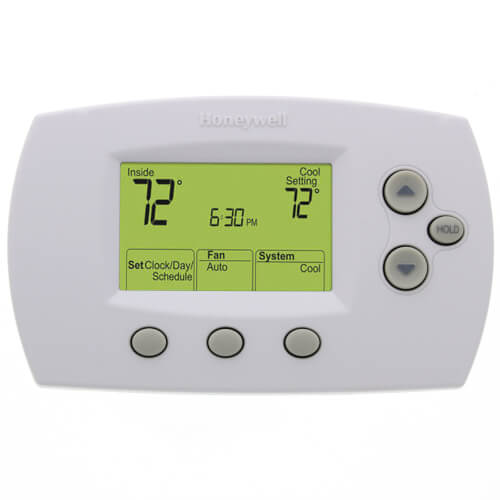
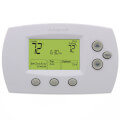
FocusPro Programmable, 1H/1C, Standard Display Thermostat
 --%3E %3Csvg version='1.1' id='Fill' xmlns='http://www.w3.org/2000/svg' xmlns:xlink='http://www.w3.org/1999/xlink' x='0px' y='0px' viewBox='0 0 100 100' enable-background='new 0 0 100 100' xml:space='preserve'%3E %3Cpath fill='%23F15C02' d='M79.44,0.95H20.56C9.78,0.95,0.95,9.78,0.95,20.56v58.87c0,10.79,8.82,19.61,19.61,19.61h58.87 c10.79,0,19.61-8.83,19.61-19.61V20.56C99.05,9.78,90.22,0.95,79.44,0.95z M65.38,58.24l9.38,29.58L49.69,69.78L24.5,87.82 l9.34-29.6L8.8,39.6l30.73-0.17c0,0,6.98-19.61,10-28.93c0.54,1.36,9.88,29.1,9.88,29.1H91.2L65.38,58.24z'/%3E %3C/svg%3E)
 --%3E %3Csvg version='1.1' id='Half' xmlns='http://www.w3.org/2000/svg' xmlns:xlink='http://www.w3.org/1999/xlink' x='0px' y='0px' viewBox='0 0 100 100' enable-background='new 0 0 100 100' xml:space='preserve'%3E %3Cg%3E %3Cpath fill='%23F15C02' d='M30.05,70.23l3.79-12.01L8.8,39.6l30.73-0.17c0,0,6.98-19.61,10-28.93c0.54,1.36,9.88,29.1,9.88,29.1h1.58 L93.71,7.18c-3.58-3.82-8.66-6.23-14.28-6.23H20.56C9.78,0.95,0.95,9.78,0.95,20.56v58.87c0,5.41,2.22,10.32,5.79,13.88 L30.05,70.23z'/%3E %3C/g%3E %3Cpath fill='%23FBC8B4' d='M93.71,7.18L60.98,39.6H91.2L65.38,58.24l9.38,29.58L49.69,69.78L24.5,87.82l5.55-17.59L6.75,93.32 c3.55,3.54,8.44,5.73,13.82,5.73h58.87c10.79,0,19.61-8.83,19.61-19.61V20.56C99.05,15.4,97.01,10.69,93.71,7.18z'/%3E %3C/svg%3E)
' fill='%23F15C02' d='M49 0C21.938 0 0 21.938 0 49s21.938 49 49 49 49-21.938 49-49S76.062 0 49 0m0 82.709a7.54 7.54 0 1 1 0-15.08 7.54 7.54 0 0 1 0 15.08m7.54-28.412a7.541 7.541 0 0 1-15.08 0V22.831a7.54 7.54 0 0 1 15.08 0v31.466z'/%3E%3C/svg%3E)
MANUALS (6)

Product Highlights


Description
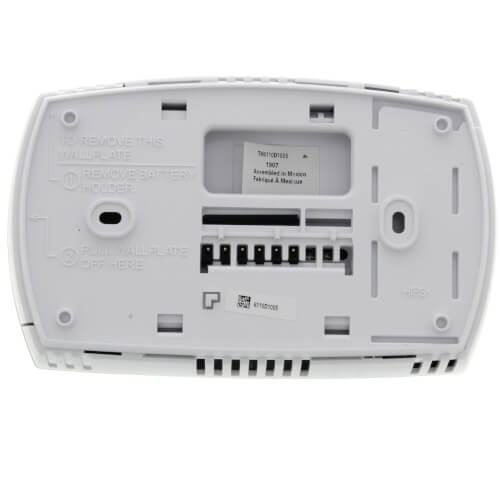
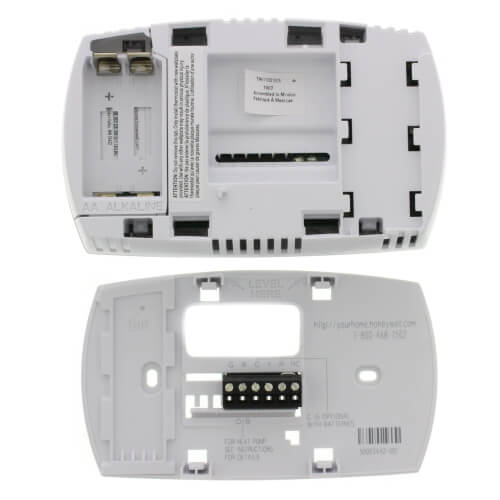
1 heat/1 cool conventional and heat pump programmable thermostat with R, Rc, C, W (O/B), Y and G terminals. Provides electronic control of 24 Vac conventional and heat pump systems or 750 mV heating systems.
Features
- Weekday/Weekend programming - use as a 5-1-1 (Weekdays, Saturday, Sunday) or 5-2 (Weekdays, Weekend) programmable thermostat, whichever best fits your lifestyle.
- Large, clear, backlit display - easy to read in various lighting conditions.
- Display size options - available in large screen or standard.
- Precise comfort control (+/- 1ªF) - maintains consistent comfort to the highest level of accuracy.
- Simplified programming and operation.
- Easy change battery door - flip out door allows for easy battery replacement without removing or disassembling the thermostat.
- Built in instructions - simple, pull out instruction manual.
- Energy savings - program to save up to 33%* on annual heating and cooling costs.
- Adaptive Intelligent Recovery - ensures programmed temperature is reached by programmed time.
- Temperature range stops - prevents user from setting the temperature too high or too low.
- 5-year limited warranty.
Specs
| Amperage: | 1 |
|---|---|
| Application: | Heat Pump Single-Stage (Heat/Cool) |
| Stages: | 1 Heat/1 Cool |
| Programmability: | Programmable 5-1-1 Day |
| User Interface: | Push Button |
| Mount: | Horizontal |
| Options: | Auto Changeover Fan Control |
| Power Method: | Battery Hardwired |
| Changeover: | Auto Manual |
| Display Size: | 2.75 sq. in. |
| Temperature Range (F): | 40°F - 99°F |
| Max Temp Differential: | 1°F |
| Operating Humidity: | 5 to 90% RH, non-condensing |
| Voltage: | Low voltage 24V 750mV |
| Wattage: | 0.4 to 30 |
| Wiring: | C G R Rc W(O/B) Y |
| Frequency: | 50 Hz 60 Hz |
| Color: | Premier White |
| Height: | 3-9/16" |
| Width (Inches): | 5-13/16" |
| Depth (Inches): | 1-1/2" |
| Humidity Control: | No |
| Wireless: | No |


Questions?
Compare Similar Products
Single-Stage (Heat/Cool)
5-1-1 Day
You May Also Need
Product Reviews
Most Liked Positive Review
Excellent product,not for the novice.
Most Liked Negative Review
 --%3E %3Csvg version='1.1' id='With-RB' xmlns='http://www.w3.org/2000/svg' xmlns:xlink='http://www.w3.org/1999/xlink' x='0px' y='0px' viewBox='0 0 100 100' enable-background='new 0 0 100 100' xml:space='preserve'%3E %3Cpath fill='%23FBC8B4' d='M79.44,0.95H20.56C9.78,0.95,0.95,9.78,0.95,20.56v58.87c0,10.79,8.82,19.61,19.61,19.61h58.87 c10.79,0,19.61-8.83,19.61-19.61V20.56C99.05,9.78,90.22,0.95,79.44,0.95z M65.38,58.24l9.38,29.58L49.69,69.78L24.5,87.82 l9.34-29.6L8.8,39.6l30.73-0.17c0,0,6.98-19.61,10-28.93c0.54,1.36,9.88,29.1,9.88,29.1H91.2L65.38,58.24z'/%3E %3C/svg%3E)
TH6110D Looks Good but with
I WOULD BUY IT AGAIN .

Only thermostat for 3 wire,series 20, power on/off hydronic
Replacement thermostat is perfect
my thermostt
I would definately buy again
Yes I would
Yes
Bright back light
TH6110D Looks Good but with
Easy to Install/Operate but Chilly
Product Q&A
13 QuestionsQ: i have a gas furnace for heating and an air conditioner for cooling. Will this thermostat work for me or is it only compatible with heat pump systems?
Asked by Denny 11 years ago
Add your answer
Verified Reply- SupplyHouse StaffThis would be compatible with a single stage system heat/cool or a heat pump system. So this sounds like a perfectly acceptable application for this thermostat.
Hi: This should be fine with conventional systems, oil, gas, etc... .....Bill
Works with my gas furnace and cooling Sent from my iPhone
Should work fine. Mine system is a gas hvac, no heat pump
Yes, this will work and I think it is the best one on the market unless you want one with an internet connection. Easy to use and very happy with the 2 I bought!
Q: How does the hold button work?
Asked by Carol 12 years ago
Add your answer
Verified Reply- SupplyHouse StaffThe “Hold” feature turns off the program schedule and allows you to adjust the thermostat manually, as needed. Whatever temperature you set will be maintained 24 hours a day, until you manually change it, or press RUN SCHEDULE to cancel “Hold” and resume the programmed schedule.
Q: Can this thermostat be used with a Zone system, which is both heating and cooling. 1 Thermostat upstairs and 1 Thermostat downstairs?
Asked by Easy Johnson 14 years ago
Add your answer
Verified Reply- PexSupply StaffIt can, as long as you have a separate thermostat for each zone and single-stage heating and cooling sources.
This is what I used it for. 2 zone forced air / a/c. works fine
Yes, that's exactly how I installed mine. I have central air for cooling and a boiler for heating, with 3 separate zones. I used 3 thermostats, they work great and were compatible with basically any combination of services. Brian Evanich
With heating you usually have zone valves and you could control heat from both locations. With AC usually only one thermistat controls the unit. So you have to select one of them for the AC temperature. That is how I have it set up in my home. The AC is set from the upstairs where the temp would be the highest.
Q: Will this t-stat work with portable comfort control model REM5000R1001
Asked by NA 14 years ago
Add your answer
Verified Reply- PexSupply StaffIt will not. Only Honeywell RedLINK thermostats are compatible with the Portable Comfrot Control.
The REM500R1001 is a wireless communicating network.The Focuspro is a hard wired thermostat. So the Focuspro will not integrate into a wireless communicating network.
Q: Can this be programmed so renters can only use a certain temperature range eg 70 - 80 degrees F?
Asked by 15 years ago
Add your answer
Verified Reply- PexSupply StaffNo, this thermostat does not have that capability. You can program it within that range, but renters would be able to override the program settings.
No. This t-stat does not allow you to set the max & minimum temp ranges. If you want one that does this purchase a Robertshaw RS5110 t-stat.
Yes it can be programmed but they could change it. The arrows at the right can be pushed to go up or down temporarily but will revert back to what was programmed. Hope this helped!
Q: my termostat is not workin said battey is not can you help me
Asked by ben 16 years ago
Add your answer
Verified Reply- PexSupply StaffPlease see page 17 of the following manual for information on battery replacement: http://s3.pexsupply.com/manuals/1249544874360/Honeywell_TH6110D1005_Operating_Manual.pdf
Q: The thermostat shows the wrong time. How do I fix it? Is it a battery problem ! Thanks, Vince
Asked by 16 years ago
Add your answer
Verified Reply- PexSupply StaffIt should not be a battery problem. Instructions for setting the date and time can be found on page 6 of the following manual: http://s3.pexsupply.com/manuals/1249544874360/Honeywell_TH6110D1005_Operating_Manual.pdf
Q: Just bought a new honeywell programmable thermostat TH6110. Display does not light up when button is pushed. Is there something special you have to do to get the lighted display. Thaniks
Asked by captquacker 16 years ago
Add your answer
Verified Reply- PexSupply StaffThe Display should light up if any button is pressed. If it does not light it up, it is possible the thermostat is defective.
Q: What should be the heat cycle rate for a steam gas boiler?
Asked by 16 years ago
Add your answer
Verified Reply- PexSupply StaffFirst, you need to go into the Installer Set-up and configure the thermostat to match the installed heating/cooling system and customize feature operation as you desire. In SET-UP Function #5 STAGE 1 HEAT CYCLE RATE (CPH: cycles/hour), you need to hit “1” for Steam or Gravity Systems. Please follow the directions in the Installer Guide on Page 6.
Q: i've changed the batteries in this unit now it says tempory and the heat wont go on?????
Asked by 16 years ago
Add your answer
Verified Reply- PexSupply StaffThe batteries used for your thermostat should always be changed once a year. If the new batteries are installed within 2 minutes from the time you took the old batteries out, the time and day will not have to be reset; or it might be in the “Hold” setting and you would need to press “Run Schedule” to resume the program schedule. Also make sure the thermostat is set to the system you want to control (heat, cool or auto).