





'/%3E%3C/svg%3E)
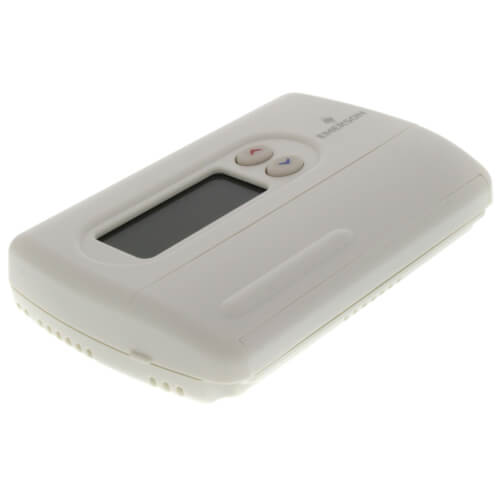
80 Series Programmable, 1H/1C, Digital Thermostat
 --%3E %3Csvg version='1.1' id='Fill' xmlns='http://www.w3.org/2000/svg' xmlns:xlink='http://www.w3.org/1999/xlink' x='0px' y='0px' viewBox='0 0 100 100' enable-background='new 0 0 100 100' xml:space='preserve'%3E %3Cpath fill='%23F15C02' d='M79.44,0.95H20.56C9.78,0.95,0.95,9.78,0.95,20.56v58.87c0,10.79,8.82,19.61,19.61,19.61h58.87 c10.79,0,19.61-8.83,19.61-19.61V20.56C99.05,9.78,90.22,0.95,79.44,0.95z M65.38,58.24l9.38,29.58L49.69,69.78L24.5,87.82 l9.34-29.6L8.8,39.6l30.73-0.17c0,0,6.98-19.61,10-28.93c0.54,1.36,9.88,29.1,9.88,29.1H91.2L65.38,58.24z'/%3E %3C/svg%3E)


MANUALS (4)
Product Highlights


Description
1F80-361
5+1+1 Day Programmable Thermostat, Hardwired or Battery Powered
- Programmability: 5-1-1 Day Programmable
- Application: Gas, Oil or Electric; Millivolt
- Color: White
- User Interface: Soft Key
- Power Method: Battery or Hardwired
- Stages: 1 Heat/1 Cool
- Mounting: Horizontal
Specs
| Amperage: | 1.5 |
|---|---|
| Application: | Single-Stage (Heat/Cool) Heat Pump |
| Stages: | 1 Heat/1 Cool |
| Programmability: | Programmable 5-1-1 Day |
| User Interface: | Push Button |
| Mount: | Horizontal |
| Options: | Large Display |
| Power Method: | Hardwired Battery |
| Changeover: | Manual |
| Temperature Range (F): | 45°F - 90°F |
| Voltage: | 24V Low voltage |
| Wattage: | 1.5 to 45 |
| Wiring: | C B G O Rc W Rh Y |
| Color: | White |
| Height: | 3-8/10" |
| Width (Inches): | 6-1/10" |
| Depth (Inches): | 1-1/5" |
| Wireless: | No |
| Humidity Control: | No |


Questions?
Compare Similar Products
Heat Pump
5-1-1 Day
You May Also Need
Product Reviews
Most Liked Positive Review
 --%3E %3Csvg version='1.1' id='With-RB' xmlns='http://www.w3.org/2000/svg' xmlns:xlink='http://www.w3.org/1999/xlink' x='0px' y='0px' viewBox='0 0 100 100' enable-background='new 0 0 100 100' xml:space='preserve'%3E %3Cpath fill='%23FBC8B4' d='M79.44,0.95H20.56C9.78,0.95,0.95,9.78,0.95,20.56v58.87c0,10.79,8.82,19.61,19.61,19.61h58.87 c10.79,0,19.61-8.83,19.61-19.61V20.56C99.05,9.78,90.22,0.95,79.44,0.95z M65.38,58.24l9.38,29.58L49.69,69.78L24.5,87.82 l9.34-29.6L8.8,39.6l30.73-0.17c0,0,6.98-19.61,10-28.93c0.54,1.36,9.88,29.1,9.88,29.1H91.2L65.38,58.24z'/%3E %3C/svg%3E)
Thermostat Review
Most Liked Negative Review
Not the same as thermostat it replaced
Possibly I would probably go Nest for the next round
Thermostat
Cycle Click
Yes, would buy again.
I would purchase again from them
This thermostat is working well.
I would buy it again
It works!
Repeat purchase
Programmable Home Thermostat
Product Q&A
38 QuestionsQ: What does the display of a star under the temp mean?I replaced thebatterys but the star is still there.
Asked by Rosie 12 years ago
Add your answer
Verified Reply- SupplyHouse StaffThe Snowflake Icon * is displayed (non-flashing) when the SYSTEM switch is in the COOL position.. Snowflake is displayed (flashing) if the thermostat is in lockout mode to prevent the compressor from cycling too quickly.
I think the star is an asterisk denoting cooling mode (a snowflake). Switch to heating mode and you will see a flame.
Sorry read instructions, yea I know, my setup went smoothly. possible that batteries or the Unit is defective. The star may indicate you are still in the setup 'mode' Dave SupplyHouse "What does the display of a star under the temp mean?I replaced thebatterys but the star is still there."
Q: Our thermostat keeps defaulting to "hold" at 62 degrees. I have tried to override it with the "run" button, but it continues to switch to the "hold" setting. Any suggestions?
Asked by Aubjohansson 13 years ago
Add your answer
Take the batteries out then put them back in to reset the thermostat. Set the time. If it still has the same issue the thermostat is fried and needs to be replaced.
1st- Read Manual, or go online to Download Manual. Follow Instructions If it Doesn't RESET, then it is probably needs New Battery(s) or it has been 'Fried' & needs to be Replaced My previous Unit had similar problem & All attempts to Reset were in vain, so i bought replacement Online @ resonably good price & replaced with no further problems. Best of luck...good thing they are not expensive !
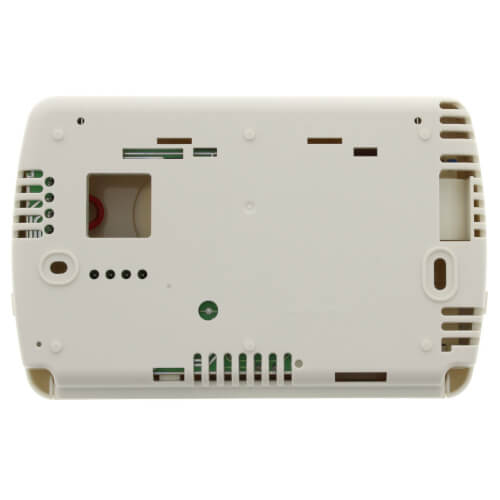
Q: This thermostat is smaller that the one it replaced. Where can I buy a wallplate to go behind it to hide the old color that the room had been painted?
Asked by Greg 13 years ago
Add your answer
Verified Reply- PexSupply StaffA compatible wallplate is part F61-2500. It can be found here on our site : http://www.pexsupply.com/White-Rodgers-F61-2500-Wallplate-For-All-1F80-Series-Thermostats
1) Patch and match new paint, but paint may be old like mine and new paint won't really match. 2) See if Home Depot / Lowes / Etc have something that will do the job. Take an outline with you to the store. 3) Buy a piece of plastic sheeting matching the thermostat color, cut to fit and glue to wall. Good luck.
Q: Can I download progamming instructions for the White Rodgers 80 Series 1H/1C Digital Thermostat ?
Asked by Buster 14 years ago
Add your answer
Verified Reply- PexSupply StaffPlease refer to the Installation Instructions at the link below. http://s3.pexsupply.com/manuals/1249544587127/White_Rodgers_1F80-361_Instructions.pdf
Q: what does low battery mean
Asked by jd 14 years ago
Add your answer
Verified Reply- PexSupply StaffThis thermostat can use two AA batteries for either primary or backup power. When BATT is displayed on the screen, it means that these batteries should be replaced.
Your backup batteries under the plastic cover are running low. Take the cover off and replace them with 2 new AA batteries.
pop open the cover on the thermostat (use a flat head screw driver, or twist a coin in the crack, if you can't get it with your fingers). there's a AA battery inside. replace it.
Q: 1F80 361 ,working fine for two years and after black out, no displae except current temprature. No clocke etc. When switch cold, on fan works. Auto mode not work. None displaying except current temp. Battery gets low in few minutes after change. Seem the unit got chort circuited. Do I need a replacement? same model ? thanks
Asked by Tint 14 years ago
Add your answer
Replace the thermostat. The electronics are not repairable. Levi Ross Levi's Energy Service LLC
I have had several blackouts over the past 2 years also, but the thermostat continues to work perfectly. I would agree that your thermostat is damaged and would need to be replaced. Sorry that I couldn't be more helpful.
It does sound like your thermostat got fried and may need to be replaced. Power blackouts often involve a surge just before the blackout so it's not so suprising (although we get a lot of blackouts where we live and I haven't had these problems: the thermostat is wired to a 12 V transformer which usually shields it from the surge). If it does need to be replaced, I'd get the same model. I have this model for years and love it. Works well, very easy to install and program. However call the manufacturer first to confirm that it does need to be replaced (and maybe they will warrantee it!). Good luck.
Q: Can you easily change from C to F temperatures?
Asked by Ben 14 years ago
Add your answer
Verified Reply- PexSupply StaffTo change between Fahrenheit and Celsius, press RUN, then press RUN and PRGM at the same time. This takes you to the Configuration Menu. Keep pressing HOLD until you advance to Step 8. This step allows you to select either Fahrenheit or Celsius temperature display using the up and down arrows. Step 8 is the last step in the menu. Press RUN to return to normal operation.
Easy to do by entering the configuration menu. 1st: Press Run. Then press Prgm & Run at the same time. Then press Hold multiple times to advance the menu options until C/F is selectable. (Press "Time" to back if you overshoot) The up/down arrows are used to change from C to F. Press Run to exit.
Yes, it's very easy and well-explained in the instructions. Alan Forbes Forbes Plumbing Berkeley, CA
Press 'Run" to make sure thermostat is in run mode. Simultaneously press Prgm and Run, you will see HOLD 0:00 displayed. Press the Hold button 7 times and you will see either C or F displayed. Press the up or down arrow to switch from one to the other. Press "Run" to finish.
Check the owners manual, if you have it. You can usually go on the manufacturer's web site and download manual, just have the model number handy.
Q: My furnace is blowing cool air and the setting is on heat. What could be the problem?
Asked by steward 14 years ago
Add your answer
maybe your pilot light is out, but the fan is turned on.
You would have to indicate what kind of furnace it is? I would recommend if it is a oil or gas furnace, to check the fuel source to make sure you have gas or oil! Then try jumping out T and T on the furnace to see if the furnace fires up, then you can tell if it the furnace or tstat.
Q: How do you delete programmed settings and just use manual operations? I do not want the thermostat to run on any previous;y set programs, but rather run according to manual settings
Asked by eliz 14 years ago
Add your answer
Verified Reply- PexSupply StaffYou can't delete the programmed settings, but you can use the Hold Mode to operate manually for an indefinite period. Press the hold button before setting your desired temperature and press 'run' to return to programmed operation (at which point you can enter hold mode again for a different temperature).
manually set setting you want and push "hold" button.
To delete previous settings, you have to use the "prgm" & "time" buttons and change every setting that has been set to the setting you want.
Push the hold button. Programs will not run.
Don't worry about the preset programs. Press hold and set the desired temperature using the up and down arrows. Change whenever you want by using the same up and down arrows.
Just set the desired temperature and push the "Hold" button. When you want it to go back to the program mode, push "Run".
As far as I know you can not delete the programmed settings but you can manually adjust the temperature up or down anytime you want. You can also just use the "hold" mode to maintain a set temperature indefinitely and just change the hold temperature whenever you want which effectively bypasses the programmed settings.
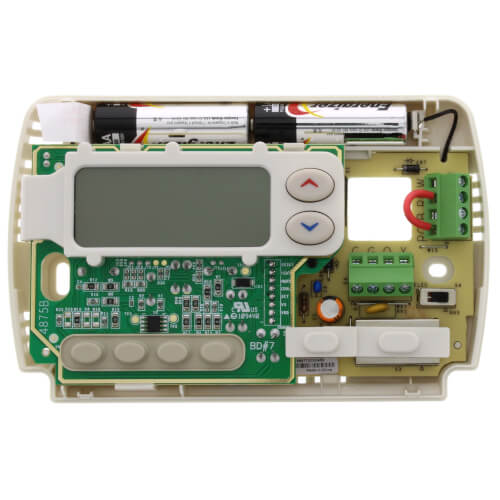
Q: How do you remove the section that contains the batteries? Does it snap off in some manner or are there screws that need to be removed?
Asked by Anonymous 15 years ago
Add your answer
Are your talking about a White-Rogers 1F80-XXX style thermostat? If so, the batteries provide power to the thermostat; the batteries are not meant to be disconnected. For further clarification, call White-Rogers.
Hi, I presume the thermostat has not been installed. There is a crevice on the top side of the device as shown. Using fingernails pull front of the device away from the back revealing the battery chamber at the top which should have 2 AA batteries in series with + poles to the left. Line up buttons on back with button holes on front and squeeze the 2 halves together. Voila! To remove the backside (battery chamber) from the wall, the screws are apparent when you take off the front. JAC
No screws. Squeeze both sides gently and pull straight out. If the cover sticks a little, use a finger on your other hand to pull on the lower left corner of the cover.
Battery is located at the top of the stat. You can stick a fingernail in the seem that goes around the case and pop off the front to access the battery. .
Yes, the entire plastic piece snaps off of the unit to access the batteries.. You can use your fingernails in the top two corners to help pry off the face.